.svg)
 Healthcare
 Finance
 Retail
 SaaS & Digital
 eCommerce
 Education
 Salesforce
  HubSpot
 Pipedrive
 Mailchimp
 Klaviyo
 Zendesk
  Intercom
 Freshdesk
 HelpScout
  Front
Front Jira
Jira Slack
Slack  MS Teams
 Zoom
Zoom Google Sheets
  Zapier
  Integrately
 Make
Make  Webhooks



 Sign In
 MS Teams

Chapter 1
What Is Closing the Feedback Loop?
Every company with a survey has the same quiet problem. The feedback comes in. Somebody exports it, maybe drops it in a slide, and then everyone moves on to the next quarter. The customer who took three minutes to tell you something? They hear nothing back.
Closing the feedback loop is the fix, and it's simpler than most teams make it. It's the practice of responding to the customer who gave you feedback, acting on what they said, and letting them know you did. Not a thank-you auto-reply. An actual answer.
Forrester defines it as communicating with customers about their feedback, which sounds obvious until you notice how few businesses do it. That's the gap this guide is about. It covers what closing the loop actually means, why the silent version costs you customers, the process behind it, and how to run the whole thing when you're getting not ten responses a month but ten thousand. By the end you'll have a working model you can set up this quarter.
Closing the feedback loop is the process of following up with customers after they give feedback. You act on what they told you, and you communicate back what you did about it. It turns feedback from a one-way survey into a two-way conversation. The loop "closes" at the moment the customer learns their input led to something real.
An open loop stops at collection. You ask, they answer, and the trail goes cold. The customer can't tell whether their feedback was read, ignored, or lost. A closed loop confirms the opposite. Their voice reached a person, that person did something, and here's the proof. That confirmation is what makes the next round of feedback honest, because people only keep answering when answering seems to matter.
Closing the Loop vs Acknowledging Feedback
Here's the distinction that trips teams up. Acknowledging feedback is not closing the loop. "Thanks for your response, we value your input" is a receipt, not a resolution. The loop closes on the outcome you deliver. You either fixed the specific thing that customer raised, or you changed something and said so, or you explained honestly why you can't. Anything short of that leaves the loop open, and an auto-acknowledgment that pretends to be a resolution often reads worse than silence, because now the customer knows you saw the message and still did nothing.
The closed loop also isn't only for angry customers. A detractor who complained needs a recovery. A promoter who praised you needs a thank-you and maybe a referral ask. A passive who shrugged needs a nudge before a competitor gets there first. Different responses, same principle. The input produced a reaction the customer can see.
Open Loop vs Closed Loop
The difference is one step, and it's always the same step.
- Open loop: Collect feedback. Analyze it internally. Move on. The customer never hears back. Trust erodes quietly, and response rates fall over time as people learn their feedback disappears into a void.
- Closed loop: Collect feedback. Analyze it. Act on it. Then close it by telling the customer what happened. Trust compounds, and response rates hold because feedback visibly does something.
Most feedback systems are open loops wearing a closed-loop badge. They automate the survey and the dashboard, the two easy parts, and leave the follow up to whoever remembers. Nobody remembers. So the loop stays open, and the program slowly stops working.
Chapter 2
Why Closing the Feedback Loop Matters
Closing the loop matters because the customer who complains and hears nothing doesn't just leave. They tell people why. Silence after feedback reads as indifference, and indifference is what turns a fixable problem into a lost account plus a bad review. Everything below is a version of that one mechanic playing out across loyalty, revenue, reputation, and your roadmap.
It Prevents Churn and Builds Loyalty
Reducing customer effort is a stronger predictor of loyalty than trying to delight people, according to the research from CEB published in the Harvard Business Review. When a customer raises an issue and you resolve it and follow up, you've done the single most loyalty-building thing available to you. You made a frustrating experience easy.
The retention math is blunt. A detractor you ignore churns and warns others. A detractor you recover often becomes more loyal than a customer who never had a problem, because you proved you'd show up when it counted. That swing, from a churned account spreading negative word of mouth to a retained one spreading positive, is the entire return on a closed-loop program. Everything else is process in service of that swing.
It Compounds Across the Whole Program
Bain & Company's research on the Net Promoter System, the work that established NPS as a growth metric, found that companies built around customer loyalty consistently outgrow their peers. Not because of the score. Because of the operational system wrapped around it, and closing the loop is the beating part of that system. A score you don't act on is a vanity metric. A score you close on is an early-warning network that catches at-risk accounts while there's still time to save them.
It Protects Your Reputation
Feedback you don't close doesn't stay private. An ignored complaint becomes a public review, a social post, a warning to a colleague evaluating you. Closing the loop moves that moment out of public view and into a resolved conversation. And when you close a loop on a public review, where everyone can see you show up, you're not just recovering one customer. You're showing every future customer reading that thread how you handle problems.
It Feeds Your Roadmap
This is the benefit leaders underrate. When you follow up on feedback, you learn the root cause behind the score, not just the number. You find out the onboarding step that confused three enterprise accounts, the billing message that reads as a threat, the feature gap that keeps surfacing. Open loops give you data. Closed loops give you direction, because the act of following up is where the "why" behind the score comes out.
It Sharpens the Team
There's an internal benefit too. A team that closes loops learns what actually goes wrong, over and over, in the customer's own words. Support agents get better at recovery because they do it deliberately instead of dodging it. Product hears the friction firsthand. The closed loop turns feedback into a training signal for the people who have to act on it, which is why teams that close loops steadily get better at the underlying problems themselves, beyond just reacting to them.
Chapter 3
The Closed-Loop Feedback Process: The Four Stages
The closed-loop feedback process runs in four stages: Ask, Categorize, Act, and Follow up. Ask is the survey. Categorize is sorting responses by type and urgency. Act is doing something about them. Follow up is telling the customer what you did. The first three are internal. Only the fourth reaches the customer, which is exactly why it's the one that gets dropped.
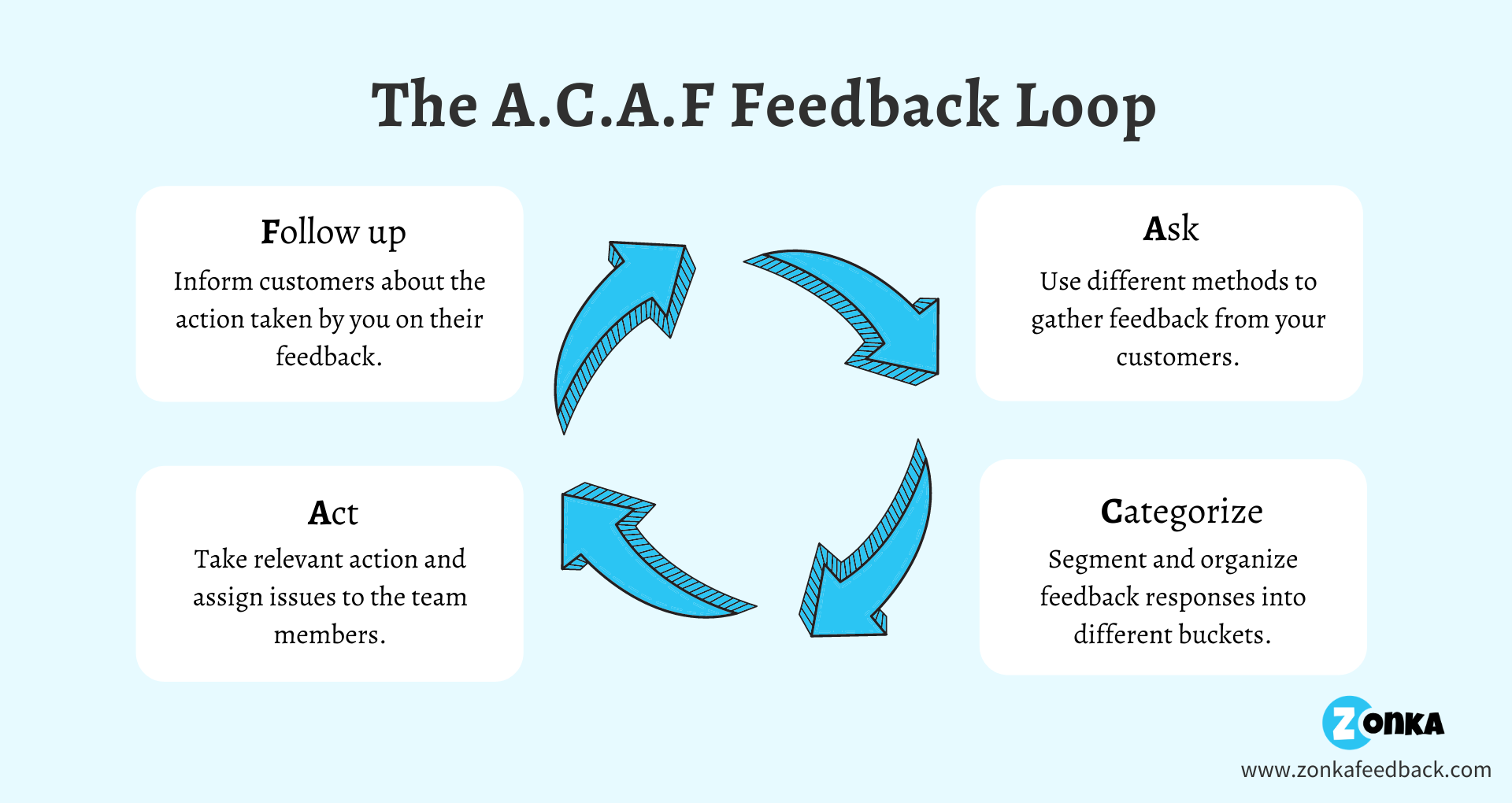
This four-stage model is often called the ACAF loop, and it's worth understanding as a named framework rather than a vague "act on feedback" instruction. We've broken it down step by step in our guide to the ACAF customer feedback loop, so this section stays at the level you need to run the whole cycle.
A few things the stage list hides. Categorize isn't a filing exercise. It's triage, and it decides everything downstream, because a detractor with a renewal in 30 days and a promoter offering a testimonial need different owners on different clocks. Act isn't always a fix. Sometimes it's a decision not to build the thing, communicated honestly. And Follow up has a shelf life. Close the loop a week later and the goodwill is mostly gone. Close it same-day and you've turned a complaint into proof you listen.
Two stages tend to break in practice. Speed on the Act stage, when volume climbs past what a person can read. And consistency on Follow up, when there's no system forcing it to happen. Both of those failures are why the next two sections exist, because the four stages are easy to describe and hard to run once the responses stop being countable by hand. For the automation side specifically, our piece on closing the feedback loop with automation goes deeper on triggers.
Chapter 4
How to Close the Feedback Loop at Scale
Closing the loop for ten responses is a to-do list. Closing it for ten thousand is a system, and the system has four moving parts. Detect, route, recover, measure. Get those four running and volume stops being the thing that breaks your program. Skip any one and the loop quietly reopens.
Here's the honest version first. Most teams try to scale closing the loop by hiring someone to read every response, and it works right up until it doesn't, usually around the point where reading the inbox becomes a full day's job and the important responses drown in the routine ones. You can't staff your way out of this. You design your way out. The good news is that three of the four parts run without a person once they're set up.
1. Detect What Needs a Response
Not every response needs human follow up. A promoter at 9 out of 10 with no comment can get an automated thank-you. A detractor at 2 with an angry paragraph needs a person, fast. Detection is the filter that decides which is which, and at scale it can't be manual.
This is where sentiment and theme analysis earn their keep. Instead of reading 600 comments, the system reads them for you and flags the ones that carry real frustration, the ones naming a specific broken thing, the ones from accounts that matter. Our take on sentiment analysis covers how the tone often contradicts the score, and why a 4 out of 5 with a bitter comment isn't really a 4. Detection has three practical jobs: separate the responses that need a human from the ones that don't, rank the human-needed ones by urgency, and attach enough context (score, theme, segment, account value) that whoever picks it up doesn't start from zero.
2. Route to an Owner With a Clock
A flagged response with no owner is just a louder open loop. Every response that needs action should land on a specific person, with a deadline, automatically. Detractor from an enterprise account goes to the account manager. Product complaint goes to the product lead. Billing issue goes to finance. The routing rules are simple. The discipline is making them fire without anyone remembering to push them.
That's what customer experience automation is for. It fires the trigger, creates the task, assigns the owner, and starts the SLA timer, all running off the response itself. Good routing also handles escalation. If the owner doesn't act inside the window, the task escalates to their manager rather than sitting unopened. The point is that no response should ever depend on someone happening to scroll far enough down an inbox to see it.
3. Recover the Customer
This is the human part, and no software replaces it. The owner reaches out, in the customer's channel, and does the actual work. They apologize if there's something to apologize for, fix what can be fixed, set a timeline for what can't, and close with what changes because of them. The script matters less than the speed and the specificity. "We saw your note about the export timing out on large accounts, we've shipped a fix, and it's live for you now" beats any templated apology.
Recovery has a sequence that holds up across almost every situation. Acknowledge the specific thing, not feedback in general. Take ownership without over-apologizing. Say what you're doing and by when. Then, once it's actually done, go back and confirm it. That final confirmation is the step teams skip most, and it's the one that converts the recovery into loyalty, because it's the moment the customer learns the loop actually closed.
4. Measure Whether It Worked
The metric that matters here isn't response rate. It's loop closure rate. Of the responses that needed follow up, how many actually got it, and of those, how many changed the outcome. Did the detractor's next score move? Did the at-risk account renew? Did the theme that generated 40 complaints last quarter generate fewer this quarter? This is the number that tells you the program is real and not theater. Most teams never track it, which is why most programs plateau.
Measurement also feeds back into detection. The themes you recover from most often are the ones worth fixing at the source, so the loop stops generating them. That's the difference between a program that closes the same complaint forever and one that slowly runs out of complaints to close.
The reason this scales and the manual version doesn't is that only one of the four steps needs a human. Detection, routing, and measurement can run on their own. That frees your team to spend all their time on recovery, the one step where a person actually changes the customer's mind. Businesses that run feedback through a unified customer feedback analysis layer, with thematic analysis grouping comments into patterns and impact analysis ranking which patterns actually move the score, get to skip the reading and go straight to the acting.
Chapter 5
How to Build Your Closed-Loop Process: Step by Step
The system above is the shape of the thing. This is how you stand it up from scratch. If you're building a closed-loop process for the first time, do it in this order, because getting the order wrong is the most common way these programs stall.
Step 1: Build the Loop Before the Surveys
Decide who acts on feedback and how recovery happens before a single survey goes out. Most teams do this backwards, launch collection first, and end up with a backlog of unclosed feedback and no process to handle it. Map the response types you expect (detractors, product complaints, billing issues, praise) and assign an owner to each. You want the routing decided on paper before the responses start arriving.
Step 2: Set Up Ownership
Every response type needs exactly one owner. Not a team, a person. Account managers own their accounts' detractors, support leads own case-related feedback, product owns feature themes, and someone senior owns the promoters worth turning into advocates. Ownership is covered in depth further down, but you need at least the skeleton of it in place before you go live.
Step 3: Configure Alerts So Nobody Watches an Inbox
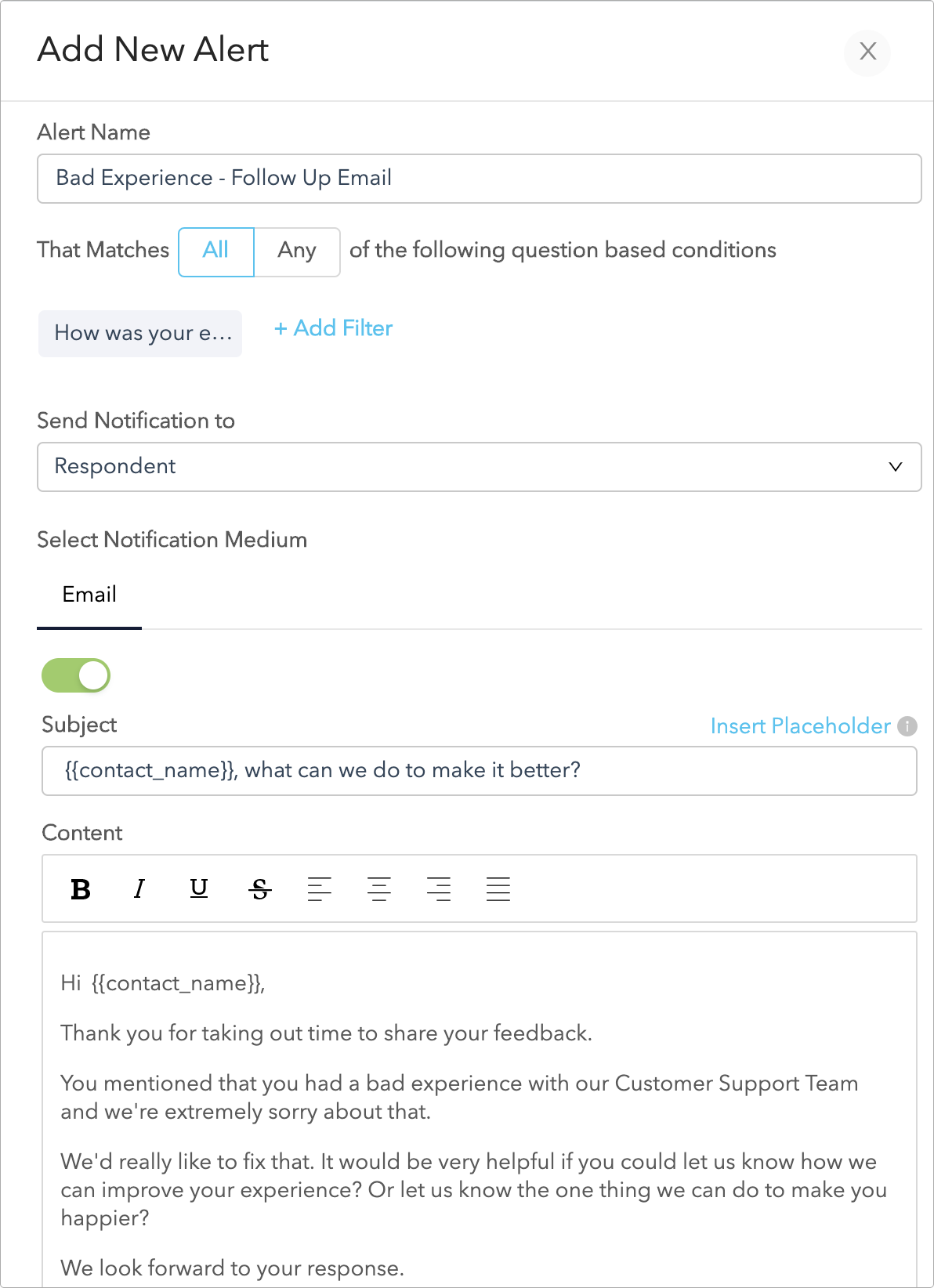
Set up notifications so the right response reaches the right owner the moment it arrives, filtered so each person sees only what's theirs. At minimum, alert on detractors, low CSAT, and high-effort CES responses, because those are the ones with a churn clock running. Everything else can flow to a daily digest.
Step 4: Collect Across the Right Channels
Turn on the channels that match where your customers actually are and when the feedback is freshest. More on channel choice below. The rule at setup is to start with the one or two channels that cover your highest-stakes moments, rather than all of them at once.
Step 5: Categorize on Arrival
Set your tagging and metric rules so responses sort themselves as they come in. Manual categorization is the first thing to break under volume, so automate the first pass and let humans refine, not sort from scratch.
Step 6: Act With Tasks and Notes
When a response needs action, it becomes a task with an owner and a due date. Use internal notes to keep the context with the record, so the next person who touches it isn't guessing. Send an automated acknowledgment if you want, but never let the acknowledgment stand in for the actual recovery.
Step 7: Follow Up and Confirm
Close the loop with the customer. Tell them what you did. Confirm the fix landed. This is the step the whole system exists to reach, and it's the one most likely to get dropped once everyone's busy, which is why steps 2 and 3 exist to force it.
Step 8: Measure and Improve
Track loop closure rate and watch whether recovered customers' next scores move. Then use the recurring themes to fix root causes, so the loop generates less of the same feedback over time. A working closed-loop process should slowly put itself out of a job on any given issue.
Take Action and Close the Feedback Loop👩💻
Analyze feedback, view insights, collaborate with your team, and close the feedback loop to prevent churn with Zonka Feedback.

Chapter 6
How Feedback Comes In: Collection Channels
Closing the loop is the last stage of a broader customer feedback program. You can't close a loop you never opened, so the system starts with collection, and where you collect shapes what you can close. Feedback arrives through more channels than most teams use, and each one changes the speed and context of your follow up. The right channel depends on where your customer is and how fresh the experience is when you ask.
Email Surveys
Email is the workhorse for relationship feedback like quarterly NPS. Embed the first question in the email body and response rates climb, because people answer without clicking through to anything. Email suits feedback that isn't tied to a single urgent moment, which makes it right for periodic health checks and relationship surveys. For the mechanics of getting the first question into the email itself, email surveys go into the setup.
SMS Surveys
SMS wins on speed and open rates, which makes it the right call for transactional moments where the memory fades fast, like a support case that just closed or a delivery that just landed. A single question over SMS surveys creates almost no friction, and because it's fast, the response comes back while the experience is still fresh enough to act on. Use it when the follow-up clock is short.
In-App and Website Surveys
Website surveys and in-app surveys catch feedback in context, while the customer is actually using the thing they're reacting to. The response comes with situational detail you'd never get from a cold email a day later, which makes the "why" easier to find and the recovery easier to target. Web pop-ups prompt for feedback in the moment, embedded surveys sit where customers already are, and in-product surveys reach people mid-workflow.
Offline and Kiosk Surveys
Offline and kiosk surveys cover the physical world, from tablets at reception and kiosks in a waiting area to a handheld device passed to a customer post-visit. QR codes on receipts, bills, and delivery boxes bridge the offline moment back to your system, so a customer who just had an in-person experience can leave feedback before the memory fades. This is the channel for anywhere your customer is physically present.
Reviews and Social Media
Reviews and social media are feedback you didn't ask for, arriving in public, and they close the loop with an audience watching. A recovered complaint on a public review is worth more than a private one because everyone sees you show up. Pulling this feedback into the same system as your survey responses, through online reputation management, means public and private feedback close through one process instead of two.
Here's the quick version of which channel fits which moment:
| Channel | Best for | Follow-up speed |
| Relationship surveys, quarterly NPS | Days | |
| SMS | Post-transaction, post-support, delivery | Hours |
| In-app / website | In-context, mid-workflow reactions | Same session to hours |
| Offline / kiosk | In-person, on-premises moments | Same visit to same day |
| Reviews / social | Public, unsolicited feedback | Fast, in public |
The point of running more than one channel isn't coverage for its own sake. It's that different feedback needs different follow-up speeds, and the channel you collected on usually tells you how fast to move. A survey software that handles every channel keeps all of it in one inbox, which matters enormously at the next stage, because feedback split across five tools is feedback nobody acts on. If you're starting from zero, our ready-to-use customer feedback template gives you a working survey to launch on any of these channels.
Chapter 7
How to Categorize Feedback Before You Act
Categorization is triage, and it's the stage that decides who acts, how fast, and on what. Skip it and every response looks equally urgent, which means none of them actually gets prioritized. Sort well and the right feedback reaches the right person before the customer gives up on you. There are four practical ways to categorize, and most programs use them in combination.
By Metric
This is the fastest cut, and it's automatic. Your survey type does the sorting for you:
- NPS splits responses into promoters (9 to 10), passives (7 to 8), and detractors (0 to 6). Detractors go to the front of the queue.
- CSAT sorts by satisfaction rating, usually a 1 to 5 or emoji scale. The low ratings are your recovery queue.
- CES flags high-effort experiences, where the customer told you something was harder than it should have been. Those predict churn and repeat contacts, so they're worth catching early.
Metric-based categorization maps cleanly to urgency, which is why it's the first filter. It tells you who's at risk before anyone reads a word of open text. For how the three metrics differ and when to use each, see our NPS software, CSAT platform, and customer effort score pages.
By Theme
This is where the real insight lives. Tagging responses by topic (billing, onboarding, product bugs, support quality) turns a pile of individual complaints into a ranked list of what's actually wrong. When a large share of your negative comments cluster on one onboarding step, that's not two hundred separate problems. It's one problem, and now you know what to fix first.
You can do this with manual tags and filters at low volume. At scale, tracking named entities groups open-text feedback automatically, so you're not hand-tagging thousands of comments. Themes are also what connect closing the loop to your roadmap, because a theme that keeps generating detractors is a fix waiting to happen.
By Segment
The same detractor score means different things from a trial user and a six-figure account renewing next month. Segmenting by location, plan, tenure, or account value lets you triage by stakes, not sentiment alone. A mid-tier passive and a top-account passive are different risks and deserve different response times. Segment filters also surface patterns a raw average hides, like one location dragging down a regional score while the rest hold steady.
By Structure: Structured vs Unstructured
Underneath all of it is one split. Structured data is the ratings, scores, and multiple-choice answers. Unstructured data is the open text, where the "why" hides. Most teams analyze the structured half and ignore the unstructured, which is backwards, because the number tells you something's wrong and the comment tells you what. We get into this properly in structured vs unstructured data. Text analytics, sentiment scoring, and entity extraction are how you make the unstructured half readable at volume instead of leaving it in a field nobody opens.
| Method | How it splits feedback | Use it to |
| By metric | Promoters / passives / detractors, CSAT, CES | Triage by urgency, automatically |
| By theme | Billing, onboarding, bugs, support | Find what to fix at the source |
| By segment | Location, plan, tenure, account value | Prioritize by stakes |
| By structure | Structured scores vs open-text comments | Read the "why," not just the "what" |
Chapter 8
Closing the Loop by Feedback Type
Not all feedback closes the same way. A detractor needs recovery, a passive needs a reason to care, and a promoter needs a channel for their enthusiasm. Same loop, three different follow ups, and running the same playbook on all three wastes the two that aren't emergencies.
Detractors: Recover Them Fast
This is the loop that pays for the whole program. A dissatisfied customer who gets a quick, personal, genuinely useful response often ends up more loyal than they were before the problem. The recovery sequence:
- Reach out fast, in a personal channel. A call or a real email from a named person, not an automated blast. Speed matters more than polish here.
- Listen before you defend. Let them explain. Half of recovery is the customer feeling heard before you propose anything.
- Own it, or empathize. If it's your fault, say so plainly. If it isn't, empathize anyway and focus on what you can do.
- Give a concrete timeline. Not "we'll look into it." A specific thing by a specific date.
- Confirm once it's fixed. Go back and tell them it's done. This is the step that closes the loop, and it's the one teams skip.
We cover the tactics in how to respond to negative feedback and the full sequence in closing the feedback loop. For NPS detractors specifically, there's a whole play around detractors in NPS.
Passives: Give Them a Reason
Passives are the quiet risk. They're satisfied enough to stay and unattached enough to leave the moment something shinier shows up. They rarely complain, so they don't trigger alarms, which is exactly why they churn without warning. The follow up here is engagement, not recovery:
- Ask what would move them. A short, specific question beats a generic "how are we doing." What's the one thing that would take you from fine to loyal?
- Act on the answer. A small upgrade, a useful resource, a feature they didn't know existed.
- Close the gap you find. Passives usually name a small, fixable thing. Fixing it is cheap and it's often the difference between a renewal and a quiet exit.
The goal is to give them a reason to care before a competitor gives them a reason to switch.
Promoters: Turn Gratitude Into Growth
Closing the loop on positive feedback is the one almost nobody does, and it's the easiest win on the board. A promoter told you they love you. Do something with it:
- Thank them personally. A real message, not a form reply.
- Open a door. A referral ask, a review request, a case study invite, an early look at something new.
- Route the praise internally. Send specific positive feedback to the team or person it's about. It's free fuel, and it tells your people what's working.
Handled well, a promoter's feedback closes into advocacy, which is the point of a positive feedback loop. Ignored, it closes into nothing, and you've taught your best customer that praising you goes nowhere too.
Chapter 9
Who Owns the Loop
A closed-loop program with no owner never actually runs. Feedback that lands on "the team" lands on nobody. Before you launch, decide who acts on what, and build the routing so it happens without anyone having to remember.
The Ownership Model
Ownership doesn't need a big team. It needs clear assignment. Even a one-person operation works if that person knows every flagged response is theirs. At scale, you split it by feedback type and stakes:
- Account managers own their accounts' detractors and at-risk renewals.
- Support leads own case-related feedback and low CSAT tied to specific interactions.
- Product owns feature themes and the recurring complaints that point at the roadmap.
- A senior owner takes the promoters worth turning into advocates, and the cross-functional themes nobody else clearly owns.
The rule is simple. Every response that needs action has exactly one name attached, and that name has a deadline. Shared ownership is how responses fall through, because when two people can act, neither has to.
Alerts: The Mechanism That Makes Ownership Real
Nobody should have to watch an inbox. The right response should reach the right person the moment it comes in, filtered so they only see what's theirs. There are three levels worth setting up:
- Real-time, every response. Useful only at low volume. Past a certain point, alerting on everything means the important ones get buried, so most teams move off this quickly.
- Metric-based. Alert on detractors, unsatisfied CSAT, and high-effort CES responses. These are the ones with a live churn risk, so they earn an interruption.
- Custom and conditional. Fire an alert only when specific conditions are met (a detractor from an enterprise account, a bug mention from a specific plan tier), and send it only to the owner who needs it. This keeps alerts relevant, which keeps people paying attention to them.
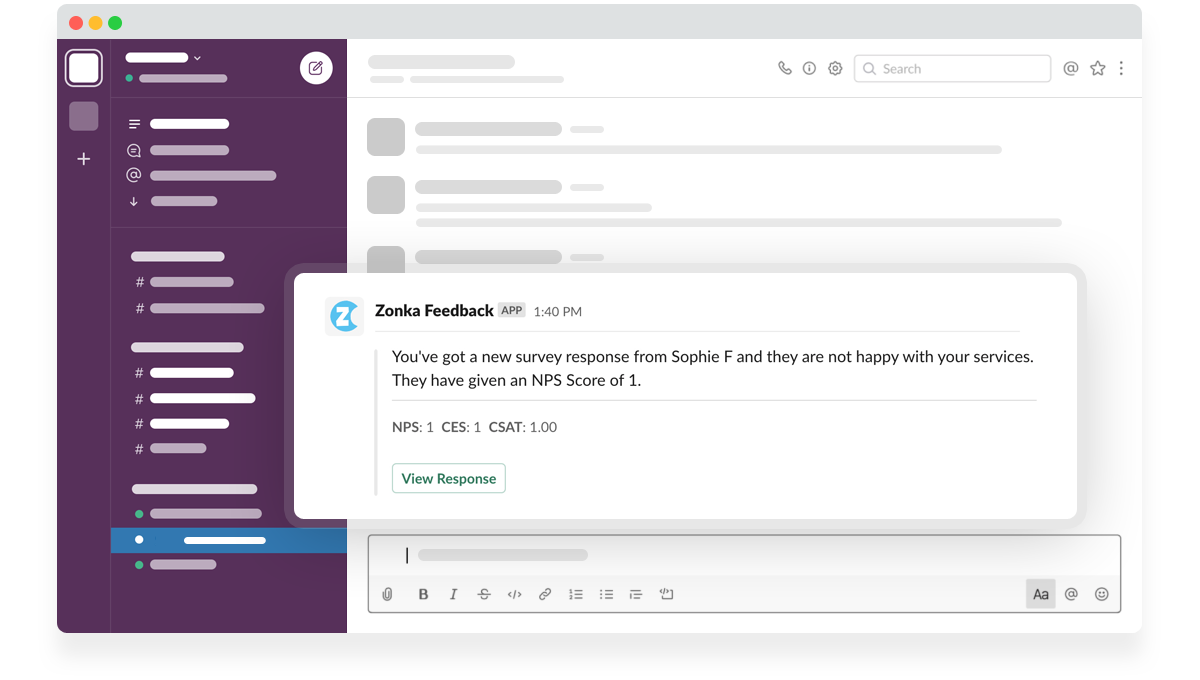
Route those alerts to where people actually work. Email for some, a Slack survey integration for teams that live there. Role-based visibility keeps it clean, so each owner sees their slice. That's the practical value of role-based CX dashboards. The CS lead, the support manager, and the product head open the same system and each sees a different, relevant view. Accountability follows visibility. When people can see the feedback that's theirs, and their manager can see whether they closed it, the loop closes.
Chapter 10
Closing the Feedback Loop with Feedback Software
You can close the loop manually at low volume with a spreadsheet and discipline. Past a few hundred responses a month, you need software, and the job of the software is specific. It collects across channels, categorizes automatically, routes to owners, and tracks whether the loop actually closed. Everything else is a feature. Those four are the system.
Here's what to look for, and what most tools miss.
| Capability | What it does for the loop | Why it matters |
| Multichannel collection | One inbox for email, SMS, in-app, offline, reviews | Feedback in five tools is feedback nobody closes |
| Auto-categorization | Sentiment, theme, and metric tagging on arrival | Turns 600 comments into 40 that need a person |
| Routing and alerts | Right response to the right owner, with an SLA | Ownership without anyone watching an inbox |
| Tasks and notes | Action and context stay on the record | The next person isn't guessing |
| AI analysis | Themes, sentiment, and impact across all responses | The "why" behind the score, in the customer's words |
| Closed-loop tracking | Follow-up status and outcome, per response | The difference between closing loops and hoping |
The verdict in one line. Pick the tool that closes loops, not the one with the prettiest dashboard. A dashboard just shows you the problem. The tool has to own the whole workflow, from the response landing to the follow-up going out to the outcome getting recorded.
This is the gap Zonka Feedback's customer feedback loop software was built to close. It collects across every channel, categorizes with AI and surfaces the responses that need a person, routes them to an owner with a deadline, and tracks whether the recovery worked. It runs the three automatable stages so your team spends its time on the one that isn't. The AI copilot layer lets anyone query feedback in plain language instead of building a report, so the "what are our top detractor themes this quarter" question takes seconds, not an afternoon.
Take Action and Close the Feedback Loop👩💻
Analyze feedback, view insights, collaborate with your team, and close the feedback loop to prevent churn with Zonka Feedback.
Chapter 11
Common Mistakes When Closing the Feedback Loop
Most closed-loop programs don't fail loudly. They erode, one skipped follow up at a time, until the whole thing is a reporting exercise nobody acts on. These are the mistakes that do the eroding.
Measuring response rate instead of loop closure rate. A 40% response rate feels like success. If you act on none of it, it's an expensive way to annoy customers. The number that matters is what percentage of feedback that needed a response actually got one, and whether it changed anything. Chase response rate and you optimize the wrong half of the loop.
Building collection before the loop. Teams stand up surveys first and figure out follow up later. Later never comes, and now you've got a backlog of unclosed feedback teaching customers you don't listen. Build the loop first. Decide who owns what and how recovery happens, then turn on the surveys.
Treating acknowledgment as closure. An auto-reply thanking someone for their feedback is not closing the loop. It's a receipt. The loop closes on outcome, and customers know the difference between "we got your message" and "we fixed the thing you told us about."
Sending NPS after every interaction. NPS measures the relationship, not the transaction. Fire it after a single support ticket and you're asking a loyalty question about a moment, and the data comes back noisy. Use CSAT or CES for the interaction. Save NPS for the relationship.
Routing everything to everyone. When an alert goes to the whole team, no single person owns it, so it sits. Alerts that aren't filtered to a specific owner train people to ignore alerts. One response, one owner, one deadline.
Waiting too long. Follow up a week after a complaint and the goodwill is gone. Close the loop same-day, or at least inside 48 hours, and you convert frustration into loyalty. Speed isn't a nice-to-have here. It's most of the effect.
Closing the loop but never fixing the source. Recovering the same complaint every week isn't a working loop, it's a treadmill. The best programs use recurring themes to fix root causes, so the loop generates less of the same feedback over time.
The customer who told you something and heard nothing back is already halfway out the door. The one you followed up with, fixed the thing for, and circled back to close it? That's the customer who stays, and tells people why. Closing the feedback loop is the difference between the two, and it comes down to one habit your competitors keep skipping. Finishing what you started when you asked.
Start with the stage everyone drops. Pick your last batch of detractors, and close the loop on every one of them this week. See what happens to their next score. If you want the system that runs the detect, route, and measure parts for you, take a self-guided tour of Zonka Feedback.