.svg)
 Healthcare
 Finance
 Retail
 SaaS & Digital
 eCommerce
 Education
 Salesforce
  HubSpot
 Pipedrive
 Mailchimp
 Klaviyo
 Zendesk
  Intercom
 Freshdesk
 HelpScout
  Front
Front Jira
Jira Slack
Slack  MS Teams
 Zoom
Zoom Google Sheets
  Zapier
  Integrately
 Make
Make  Webhooks



 Sign In
 MS Teams


TL;DR
- Customer feedback analysis is the process of extracting patterns, themes, and signals from what customers tell you across surveys, support tickets, reviews, and conversations, then acting on what you find.
- The process follows six steps: centralize sources, organize and clean, categorize by theme, detect signals (sentiment, effort, intent, urgency), prioritize by impact, and close the loop with action.
- Manual analysis works at small scale but breaks above 500 responses: inconsistent tagging, partial coverage, and insights that arrive too late to act on. AI analysis processes the same volume in minutes with consistent classification.
- Modern AI platforms run three pillars simultaneously: thematic analysis (what are they talking about), experience signals (how do they feel and what do they intend), and entity recognition (who or what specifically). Each response carries an average of 4.2 distinct topics that manual review misses.
- The metric that separates programs that drive real improvement from programs that generate reports: loop closure rate. What percentage of flagged feedback triggered a follow-up, and how many of those led to resolution.
A 3.8 satisfaction score doesn't tell you what to fix. The 2,000 comments sitting underneath it do — if anyone actually reads them.
Most businesses collect plenty of feedback. Surveys, support tickets, reviews, social media. The data exists. The gap is in making sense of it: figuring out what customers keep bringing up, how they feel about it, and what needs to happen next. That's customer feedback analysis.
This guide covers the full process: how to analyze customer feedback from feedback collection through action, the manual methods that work at small scale, the AI-powered techniques that work at any scale, and how to match the right approach to the right moment in your customer journey. Whether you collect customer feedback through survey tools, gather feedback from social media and online reviews, or pull it from customer support interactions, the analysis process is the same.
What Is Customer Feedback Analysis?
Customer feedback analysis is the systematic process of collecting, organizing, and interpreting customer comments, complaints, praise, and suggestions to identify recurring themes that inform data-driven decisions. Why is customer feedback analysis important? Because without it, businesses can't connect what customers say to what actually needs to change. The feedback comes in many forms: Net Promoter Score (NPS) survey scores, open-ended survey responses, support ticket conversations, app store and online reviews, social media mentions, sales call notes, and in-app feedback widgets.
The analysis itself has two layers. The quantitative layer handles structured feedback: quantitative data like scores, ratings, and multiple-choice responses. You calculate averages, compare customer segments, track trends over time. The qualitative layer handles unstructured feedback data: the open-text customer comments where customers explain, in their own words, what's actually going on. Combining quantitative and qualitative data is where the most useful customer insights live, and where most teams give up because reading thousands of comments doesn't scale.
In simple terms: customer feedback analysis turns scattered opinions into structured intelligence that tells your team what to fix, what to protect, and what to build next. Done consistently, it drives customer satisfaction, strengthens customer loyalty, reduces churn, and gives you the evidence base to make data-driven decisions about product, support, and customer experience strategy.
Where Customer Feedback Comes From
Gathering customer feedback isn't the problem. Most businesses already collect customer feedback from multiple channels. The problem is that each channel produces different data types, and feedback collection often happens in isolation: survey tools capture scores, customer support software captures ticket conversations, social media monitoring captures public mentions, and review platforms capture online reviews. Nobody connects them.
| Channel | Sources | Data Type |
| Direct | NPS, CSAT, CES survey tools, in-app feedback, forms, widgets | Scores + open-text |
| Support | Zendesk, Intercom, Freshdesk, customer support interactions, live chat | Mostly unstructured |
| Public | Google Reviews, G2, App Store, Trustpilot, social media platforms | Fully unstructured |
| Product | Jira, sales calls, feature requests, email threads, Slack | Scattered across tools |
The further you move from direct to product, the more unstructured the data becomes, and the more intelligence it contains. A Customer Satisfaction Score tells you whether someone was satisfied. Customer support interactions tell you why. A sales call transcript tells you what they're comparing you against. Social media mentions and online reviews tell you what they're saying when they think you're not listening. The challenge of customer feedback analysis is making sense of all of it together, not only the parts that come in neatly formatted spreadsheets.
How to Analyze Customer Feedback: The 6-Step Process
Whether you're working with a spreadsheet and 100 responses or an AI platform and 50,000, the process follows the same sequence. What changes is how much you can cover at each step and how fast you get there.
Step 1: Centralize Your Feedback Collection Sources
The first step in any customer feedback analysis isn't analyzing feedback. It's centralizing your feedback collection. Most organizations gather feedback across 4-7 tools: survey tools here, a helpdesk there, online reviews on Google and G2, social media monitoring on another platform, and NPS data living inside the CRM. Each tool shows a slice. Nobody sees the full picture.
Centralizing means connecting all these sources into one system where responses from every channel sit side by side. A customer sentiment shift that's invisible in survey data but screaming in support tickets only gets caught when both feeds run through the same analysis.
This doesn't mean one tool for everything. It means one analysis layer across everything. The customer feedback data stays in its source system. The feedback analysis happens in one place.
Step 2: Organize and Clean the Data
Raw feedback data is messy. Before any analysis, clean the raw data: remove duplicate submissions, filter out incomplete responses (less than 30% completion), flag straight-line patterns, and standardize text entries you'll segment by (location names, department labels). Non-response bias matters too: if enterprise customers are underrepresented in your feedback, your analysis won't reflect their experience.
For structured feedback (scores, ratings), this step is straightforward. For unstructured feedback data (customer comments, tickets), it means normalizing formats so the same analysis can run across survey responses, customer support emails, and review text without format-specific preprocessing.
Step 3: Categorize by Theme
This is the core of customer feedback analysis: reading responses and grouping them by topic. What are customers talking about? Billing confusion, wait times, feature requests, staff interactions, onboarding friction, product quality? Identifying recurring themes and pain points is how qualitative feedback becomes structured enough to act on.
The manual approach: To analyze customer feedback manually, read each response, assign one or more tags from a codebook, count how often each tag appears, and look for patterns. Academic researchers call this thematic analysis. CX teams call it tagging. The process is the same: read, code, group, interpret. You identify recurring themes one comment at a time.
Manual coding works at small scale. A team can reliably code 50-60 responses per hour. For a quarterly survey with 200 responses, that's a manageable afternoon. For 2,000 responses, it's 35+ hours. And the consistency problem compounds: two analysts tag the same customer comment differently, and the same analyst tags differently on Monday morning versus Friday afternoon.
The scale of what's hidden: Zonka Feedback's analysis of 1M+ open-ended feedback responses across industries and 8 languages found that each response contains an average of 4.2 distinct topics. A single customer might write about pricing, a specific support agent, a product bug, and a competitor in the same paragraph. Manual tagging catches one of those. The other three go unread.
The AI-powered approach: Natural language processing and large language models read every response, discover recurring topics, and organize them into a consistent hierarchy of themes and sub-themes. No manual codebook required. The taxonomy builds itself from the data and evolves as new patterns emerge. In simple terms: what took 35 hours of manual coding happens in minutes, and the classification logic stays consistent across every response, every channel, every language. AI-powered feedback analysis tools can identify recurring themes and pain points across thousands of customer comments that manual analysis would never surface.
Key distinction: AI doesn't replace the judgment of what themes mean. It replaces the manual reading, tagging, and counting. Humans still decide which themes matter and what to do about them. The difference is speed and coverage: AI reads all the responses, not 10-20%.
Step 4: Detect Signals Beyond Themes
Knowing what customers talk about is step one. Knowing how they feel about it, how urgently they need action, and what they intend to do next is where feedback analysis becomes genuinely useful. AI-powered sentiment analysis and signal detection extract these layers from the same customer feedback data.
Five signals, extracted from the same feedback data, give you the complete picture:
- Sentiment: Is the customer sentiment positive, negative, or neutral? The key distinction: real-time sentiment analysis should work per theme, not per response alone. A comment praising your customer support team but criticizing your billing process isn't simply "negative." It carries two signals. Nearly one-third (29%) of all customer feedback responses contain mixed sentiment like this. This is sometimes called keyword or aspect analysis: detecting sentiment tied to specific aspects of the customer experience rather than labeling the whole response. Flattening it into one label loses the signal both teams need.
- Effort: Is the customer describing a high-friction experience? Language like "had to call three times," "took forever," "still waiting" signals effort friction that predicts churn more reliably than Customer Effort Score surveys alone.
- Urgency: Does the feedback describe a time-sensitive situation? "Need this resolved today," "deadline tomorrow," "system is down." AI-powered urgency detection flags these for immediate routing rather than queue-based processing.
- Churn risk: Is the customer signaling intent to leave? "If this happens again," "considering alternatives," "not worth what we're paying." These aren't just negative customer sentiment. They're behavioral signals about customer behavior and what the customer plans to do next.
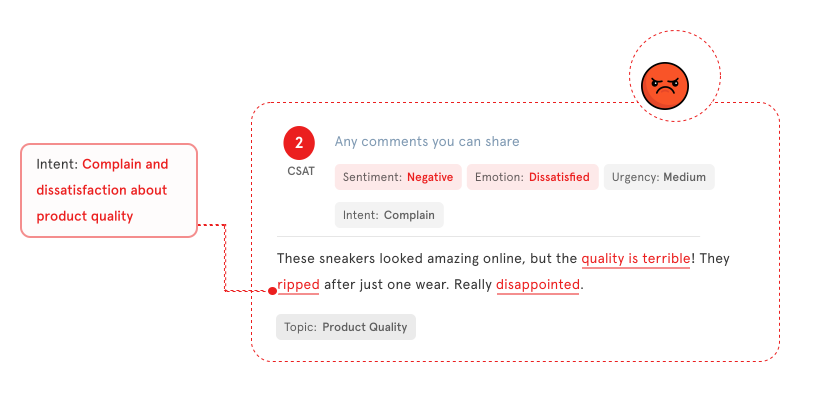
- Intent: What does the customer want to happen? Intent classification sorts responses into categories: complaint, feature request, question, praise, escalation. Each maps to a different team and a different response. Twenty-three percent of feedback responses contain clear intent signals that most teams miss because they're not looking for them.
To analyze customer feedback manually, you can detect some of these signals on a case-by-case basis. A human reading a customer comment will notice frustration or urgency. But applying real-time sentiment analysis consistently across 5,000 responses, tagging each signal at the theme level (not the response level alone), and tracking how customer sentiment shifts over time? That requires AI-powered feedback analysis tools.
Step 5: Prioritize by Impact
Not all feedback is equally important. A theme mentioned by 5% of respondents and carrying neutral customer sentiment is less urgent than a theme mentioned by 30% with negative sentiment trending worse over time. The goal is to identify trends that matter, separate emerging trends from noise, and surface the most relevant feedback for each team.
The prioritization framework that works: Impact × Trend. Plot each theme on two axes: how much impact it has (mention frequency × sentiment severity across customer segments) and which direction it's trending (improving, stable, or worsening). Tracking feedback trends over time is what separates reactive programs from proactive ones.
| Trending Negative | Stable | Trending Positive | |
| High Impact | Fix Now | Monitor Closely | Celebrate / Protect |
| Low Impact | Watch | Track | Note |
"Checkout friction" with 340 mentions and dropping sentiment? Fix now. "Staff friendliness" with 200 mentions and positive sentiment? Celebrate and protect what's working. "Parking complaints" with 45 mentions trending slightly negative? Watch but don't redirect engineering resources yet. The feedback prioritization matrix covers how to build this scoring into your analysis workflow.
Step 6: Close the Loop
Customer feedback analysis that ends at a dashboard is a waste of the entire process. The final step is action: routing the right finding to the right person, within a timeline that matters.
In simple terms: a closed-loop process means every piece of flagged feedback gets a response, an owner, and a resolution. A closed-loop process works like this:
- Detect: AI flags a theme, signal, or individual response that requires attention
- Route: The finding auto-assigns to the right person. Complaints route to support. Feature requests route to product. Churn signals route to the account owner.
- Recover: The assigned person follows up within a defined SLA window, records the outcome
- Measure: Did the at-risk customer stay? Did the process change reduce complaints? Track improvement over time.
We've seen businesses that skip the feedback loop step consistently lose detractors at 3x the rate of companies that follow up. Not because the product is worse, but because a bad experience with no follow-up signals to customers that nobody's paying attention. A strong feedback loop is the single strongest driver of customer retention and customer loyalty. Customer success teams that close the loop consistently see measurable improvement in renewal rates and expansion revenue.
When Manual Feedback Analysis Breaks (and What AI Changes)
Manual customer feedback analysis isn't wrong. For a quarterly survey with 200 responses and a team that has the time, reading every comment and tagging it by hand produces genuine insight. The problem is that it doesn't scale, and the scale threshold is lower than most teams think.
Zonka Feedback's AI in Feedback Analytics 2025 research, based on conversations with 100+ CX leaders, found that 87% of organizations still rely on manual text review to extract insights from customer feedback. The same research found that 66% report slow or missing feedback-action loops, and 93% struggle with feedback scattered across tools.
The math explains why. A three-person analyst team reviewing 2,000 open-text responses manually takes roughly two weeks. AI processes the same volume in minutes. That's not an efficiency improvement. It's a category change: the difference between monthly reports and real-time signals.
What Changes When AI Handles Customer Feedback Analysis
The shift isn't just speed. Seven dimensions change simultaneously:
| Manual Analysis | AI Customer Feedback Analysis | |
| Coverage | 5-20% of responses read | 100% analyzed in real time |
| Speed | Quarterly reports, weeks behind | Real-time alerts, same-day response |
| Signal Depth | NPS/CSAT score only | Themes + sentiment + effort + intent + entities |
| Early Warnings | Discovered in hindsight | Flagged before escalation |
| Prioritization | Gut feel and loudest voices | Data-scored impact × trend matrix |
| Team Action | Email a PDF summary | Auto-routed tasks with context |
| Consistency | 70-80% inter-rater agreement, varies by analyst | 85-95% classification accuracy, consistent across all data |
The consistency gap deserves attention. In simple terms: three analysts will tag the same customer comment three different ways. That's not a training problem. It's a fundamental limitation of manual analysis at scale. AI-powered feedback analysis tools apply the same classification logic every time, across every channel, in every language. The result is feedback trends you can actually trust across time periods.
And cross-channel visibility changes completely. Surveys say one thing. Support tickets say another. Social media and online reviews say a third. When these channels live in separate tools analyzed by separate teams, the gaps between them become invisible. When you automate customer feedback analysis across channels, AI-powered analysis that processes all sources through the same framework catches patterns that no single-channel view reveals. You gain valuable insights about the customer experience that analyzing feedback in individual tools would never connect.
The shift also opens up capabilities that didn't exist in manual workflows. Predictive analytics can flag emerging trends before they become widespread complaints. Real-time sentiment analysis catches customer sentiment shifts the same day they start. And because AI-powered tools process every response (not 10-20%), the customer insights they surface are statistically representative, not skewed by which customer comments happened to catch an analyst's attention. These are meaningful insights that give customer experience teams genuine signal rather than anecdotal noise.
The Three Pillars of AI Customer Feedback Analysis
The most effective AI platforms don't run a single technique. They run three pillars simultaneously, each answering a different question about the same feedback data:
Pillar 1: Thematic Analysis (What Are They Talking About?)
AI discovers what customers are talking about and organizes it into a consistent hierarchy. Instead of 2,000 individual comments, you see that 34% mention wait time, 22% discuss resolution quality, and 18% reference a specific product issue. The taxonomy builds itself from the data and evolves as new patterns emerge.
Before AI, this meant analysts manually reading every response, spending 40+ hours per quarter on tagging alone, producing inconsistent categories that were stale before anyone acted on them. Manual thematic analysis can't scale beyond 500 responses. AI scales to 100K+ with the same infrastructure.
The detail that matters most: each response gets tagged for all its topics, not the dominant one alone. When the average response contains 4.2 topics, tagging only the primary theme means losing 76% of the signal.
Pillar 2: Experience Signals (How Do They Feel and What Do They Want?)
This pillar splits into two sub-layers, both detected at the response level AND the theme level (a distinction that matters enormously for operational use).
Experience Quality answers "how was it?" through five signals: sentiment per topic (not per response alone), effort perception, urgency, churn risk, and emotion (frustration vs confusion vs anger). A single comment that says "Sarah at the front desk was amazing, but the WiFi was terrible and checkout took forever" carries positive sentiment on staff, negative on amenities, negative on checkout, high effort language, and medium urgency. Flattening that into one sentiment score loses everything useful. With 29% of responses containing mixed sentiment, per-theme detection isn't a nice-to-have. It's a data accuracy requirement.
Customer Intent answers "what do they want to happen next?" through five classifications: advocacy ("I've told all my friends"), feature request ("I wish you had..."), question ("How do I...?"), complaint ("This is unacceptable"), and escalation ("I want to speak to a manager"). Each maps to a different team. The routing logic writes itself. For more on how experience signals work as a system, see the dedicated guide.
Pillar 3: Entity Recognition (Who or What Specifically?)
AI extracts specific mentions of people, products, locations, and competitors from open-text feedback. When a survey respondent writes "Sarah in billing was great but the mobile app keeps crashing," entity recognition tags "Sarah" as a staff mention and "mobile app" as a product mention.
This turns unstructured text into structured data you can filter: show all comments mentioning the mobile app, show all feedback referencing a specific location, surface every competitor mention. Entity recognition is what makes customer feedback analysis operationally specific rather than abstractly directional.
Custom entities configure by industry: airlines track flight numbers, routes, cabin classes. Retail tracks product categories, brands, store locations. SaaS tracks feature names, plan tiers, integrations.
What the three pillars look like together: One comment. AI extracts three themes (staff experience, WiFi, checkout), assigns per-theme sentiment (positive, negative, negative), detects high effort language ("took forever"), flags medium churn risk ("If it happens again, we'll book the Marriott"), identifies two entities (staff member Sarah, competitor Marriott), and classifies intent as complaint + conditional churn. The whole analysis takes milliseconds. A human reading the same comment would catch most of this. A human reading 2,000 comments would not.
Where Customer Feedback Analysis Fits in the Customer Journey
Most guides on customer feedback analysis list techniques in the abstract. That's only half useful. The real question is: which technique, at which moment, to answer which question?
The CX lifecycle has five distinct stages, and each one generates a different type of feedback that demands a different analytical focus.
1. Onboarding: Reduce Friction and Improve Time-to-Value
The first 14 days after signup or purchase are when customers decide whether you're worth the investment. Friction here doesn't just cause frustration. It causes abandonment.
Customer feedback analysis during onboarding should focus on thematic analysis and intent detection. You're looking for clusters of confusion: recurring mentions of "can't find," "don't understand," or "not working." These patterns surface within days when AI is processing onboarding survey responses and early support tickets in real time.
A SaaS team collects open-text feedback after their onboarding flow. AI clusters 2,000 responses and highlights that 31% mention confusion around a specific settings page. The product team ships a guided walkthrough within the week. Onboarding CSAT moves from 3.6 to 4.2 in the next cohort. Without AI, that insight takes three weeks of manual reading. By then, two more cohorts have hit the same wall.
2. Product Engagement: Prioritize What to Build, Fix, or Improve
Once users are active, feedback volume and complexity increase. Feature requests, bug reports, usability complaints, and praise all arrive through the same channels. The signal-to-noise ratio drops.
Thematic analysis and entity recognition matter most here. Thematic analysis groups feedback into clusters: "speed," "navigation," "mobile experience," "reporting." Entity recognition goes deeper, tagging specific features, workflows, or product areas mentioned in each comment. Product managers gain precision instead of working from assumptions. When AI shows that 40% of negative sentiment after a release is tied to one specific feature's load time, that's a prioritization signal backed by data, not an anecdote from a loud customer.
3. Customer Support: Respond Faster, Reduce Escalations
Support teams deal with the sharpest edge of customer frustration. Speed matters. But so does prioritization: not every ticket is equally urgent.
Urgency detection and sentiment analysis are the key techniques here. Urgency detection flags keywords and emotional patterns like "broken," "unusable," "cancelling my account" and routes them to the front of the queue. Sentiment analysis tracks whether the overall tone of support interactions is trending positive or negative across agents, teams, or time periods.
Entity recognition adds another layer. When AI tags the specific agent, product, or feature mentioned in each ticket, support managers spot patterns that individual ticket reviews miss. If 60% of negative sentiment this week mentions the same billing workflow, that's a systemic issue, not a one-off complaint. And if entity-level data shows one agent consistently receiving higher effort scores than peers, that's a coaching signal. The agent coaching guide covers how to build this into team performance workflows.
4. Retention and Renewal: Identify At-Risk Customers Early
Renewal windows and contract anniversaries produce some of the most honest feedback you'll receive. Customers thinking about leaving tend to be more direct about what's not working.
Intent analysis and sentiment trend tracking are essential here. Intent analysis identifies phrases like "not worth it," "considering alternatives," "too expensive for what we get." These aren't sentiment signals alone. They're behavioral signals: the customer is telling you what they plan to do next. Sentiment trend tracking adds the time dimension, showing whether an account's overall tone has been declining over weeks or months, even if individual scores look acceptable.
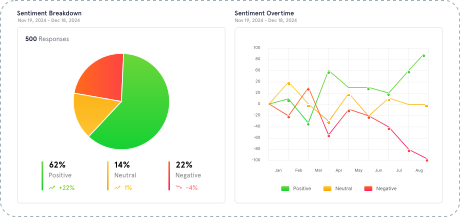
A customer might give a passive NPS score but express frustration in support tickets. AI that unifies these signals gives retention teams a complete picture before the renewal conversation, not after the churn event.
5. Advocacy: Amplify Promoters and Optimize Messaging
Positive feedback isn't a feel-good metric. It's a strategic asset when you know how to use it.
Sentiment analysis paired with entity recognition identifies what specifically drives loyalty among promoters. Is it the onboarding experience? A specific feature? The support team's responsiveness? AI surfaces the emotional language and themes tied to advocacy, so marketing and CX teams can build campaigns, case studies, and referral programs grounded in what actually resonates.
When promoters in one segment praise simplicity while promoters in another praise depth of customization, that tells marketing to segment messaging rather than pushing one value proposition everywhere. AI surfaces these distinctions by cross-referencing sentiment, themes, and customer attributes automatically.
The AI Techniques That Power Customer Feedback Analysis
The lifecycle framework above references specific techniques at each stage. Here's a decision map for what each one does, which question it answers, and when it matters most.
| AI Technique | Question It Answers | When It Matters Most |
| Sentiment Analysis | "How do customers feel?" | Always-on baseline. Tracks emotional tone across every stage. |
| Thematic Analysis | "What are customers talking about?" | Ongoing. Surfaces topics and clusters patterns over time. |
| Intent Detection | "What do they want to happen?" | Retention, renewal, and support. Classifies next-step signals. |
| Entity Recognition | "Who or what specifically?" | Support, product, multi-location. Maps feedback to specific people, products, locations. |
| Urgency Detection | "How quickly do we need to respond?" | Support and high-stakes moments. Prioritizes time-sensitive feedback. |
| Effort Detection | "How much friction did the customer experience?" | Post-interaction. Flags high-effort language that predicts churn. |
| Emotion Detection | "What emotion is driving this feedback?" | Everywhere. Distinguishes frustration from confusion from anger. |
.svg)
The difference between running one technique and running all of them is the difference between knowing "sentiment is down" and knowing "sentiment on checkout speed at the downtown branch dropped 18% this quarter, driven by high-effort language in 40% of responses, with three comments mentioning a competitor's faster process." One gives you a metric. The other gives you a brief your operations team can act on Monday morning.
How to Implement AI Customer Feedback Analysis
The analysis framework above describes what AI extracts. Implementation is how you get it running in your organization without the chaos most teams experience when "we should use AI for feedback" becomes a real project.
Step 1: Centralize Your Feedback Collection
Connect every channel that generates customer feedback to a single analysis platform. Survey tools, support tickets, online reviews, social media mentions, in-app feedback, sales call notes. If a source produces text from customer interactions, it belongs in the pipeline. Most teams start with their two highest-volume channels and expand from there.
Step 2: Choose the Right Feedback Analysis Tool
The choice of feedback analysis tool comes down to three factors: data source coverage (can it ingest from all your channels?), analysis depth (does it run all three pillars or just sentiment analysis?), and action capability (can it route findings to the right team automatically, or does it stop at a dashboard?). Customer feedback analysis tools range from simple survey tools with built-in reporting to customer service software with basic sentiment analysis to dedicated AI-powered feedback analysis tools that run thematic analysis, sentiment detection, intent classification, and entity recognition across every source. A comparison of AI feedback analytics tools covers the options in detail.
Step 3: Train, Monitor, and Refine
Modern AI-powered feedback analysis tools achieve 85-95% accuracy on sentiment classification out of the box. Fine-tuning on your specific vocabulary, industry terms, and product names pushes accuracy higher. Expect 2-4 weeks for baseline accuracy after initial setup. Monitor for drift: language patterns change, new topics emerge, and the taxonomy needs to evolve with the data.
One important nuance from the webinar Q&A with Zonka Feedback's CEO Rajiv Mehta: "We're not fine-tuning models on customer data. We extract company context, enrich prompts with contextual information, and the models keep getting better." How AI learns your business context without training on your data covers this approach in depth. And when it comes to protecting customer data, make sure your feedback analysis tool offers configurable PII stripping, regional data processing, and clear policies on how customer data flows through external LLMs.
Step 4: Align Analysis With Business KPIs
Customer feedback analysis becomes powerful when it connects to key metrics and key performance indicators that the business already tracks. Map your themes to KPIs: which themes correlate with Net Promoter Score (NPS) changes? Which entity mentions predict churn? Which customer segments show declining Customer Satisfaction Score trends? NPS measures customer loyalty over time. CSAT measures satisfaction at a moment. Customer Effort Score measures friction. Connecting qualitative feedback themes to these quantitative feedback scores is what turns a feedback analysis tool from a reporting layer into a data-driven decisions engine.
Step 5: Automate Action
The final implementation step is the most important: connect your analysis outputs to workflows. Low CSAT auto-creates a customer support case. A churn-risk signal alerts the account owner. A feature request tagged to a specific product area routes to the PM. A cluster of urgency signals triggers an escalation.
This is where closing the feedback loop stops being a concept and becomes an automated system. The analysis identifies what needs attention. The workflow ensures someone actually acts on it.
What to Measure: Connecting Customer Feedback Analysis to Business Impact
Most teams measure response rates and satisfaction scores. Both matter, but neither tells you whether your customer feedback analysis is actually driving improvement.
The metrics that separate programs generating reports from programs generating results:
- Loop closure rate: What percentage of low scores or flagged feedback triggered a follow-up? Of those, how many led to resolution? This is the single most diagnostic metric. A 40% response rate on a survey nobody acts on is worthless.
- Time to insight: How long between feedback arriving and the relevant team seeing it? Days means you're always behind. Hours means you can respond while the experience is still fresh.
- Theme-to-action rate: Of the themes your analysis surfaces each month, how many resulted in a specific action (process change, product fix, training update)? This metric also reveals whether findings are being shared across teams: support seeing product themes, product seeing support friction, marketing seeing advocacy signals. Cross-team visibility is what turns customer feedback analysis from a departmental exercise into a company-wide intelligence system.
- Recovery rate: Of the customers identified as at-risk through feedback analysis, what percentage were retained after intervention?
- Score movement per theme: When you fix an issue surfaced by feedback analysis, does the related satisfaction score actually improve? This is the evidence that your analysis is driving the right actions.
The metric hierarchy: Response rate tells you whether customers will talk to you. Theme accuracy tells you whether your analysis is capturing what they're saying. Loop closure rate tells you whether anyone's acting on it. Recovery rate tells you whether the right actions are happening. Score movement tells you whether it's working. Most teams stop at step one.
Common Mistakes That Derail Customer Feedback Analysis Programs
Most of these don't surface right away. They compound over months until you're looking at analysis outputs that nobody trusts.
Running sentiment analysis without thematic analysis. Knowing that customer sentiment dropped 12% tells you something is wrong. It doesn't tell you what. Sentiment analysis without themes is a directional signal with no specificity. You can identify trends in the numbers but can't identify patterns in the causes. Always pair them to get insights your team can act on.
Analyzing channels in isolation. Quantitative feedback in one tool, support tickets in another, social media in a third. The pattern that explains your NPS drop might only be visible when you combine survey responses with support ticket themes. Cross-channel analysis isn't optional if you want customer insights that reflect the full customer journey.
Treating every comment as equal weight. A comment from a $500K account with a renewal in 30 days carries different business weight than one from a trial user who signed up yesterday. If your analysis connects to customer records, segment by revenue, tenure, or lifecycle stage before drawing conclusions.
Building analysis before building the loop. Many teams set up collection and analysis first, then figure out the closed-loop process later. Without routing and recovery workflows in place from the start, pain points pile up with no response behind them. Build the loop first, then feed it with analysis.
Not connecting themes to pain points and customer retention. A theme dashboard that shows "billing" was mentioned 200 times is interesting. A dashboard that shows "billing" drives 40% of customer churn and costs $2M in annual customer retention risk is useful. Connect themes to business impact, or you're generating charts instead of valuable insights.
Over-indexing on volume and ignoring intensity. A theme mentioned in 5% of responses but carrying high urgency language and churn signals may matter more than a theme mentioned in 25% of responses with mild sentiment. Frequency alone isn't the right prioritization metric. Combine it with signal intensity.
Not accounting for PII in AI analysis. Customer feedback often contains personal data: names, account numbers, sometimes health or financial information. PII compliance rules for AI analysis require configurable stripping before data reaches external LLMs. This was the number one audience concern in Zonka Feedback's March 2026 webinar, with four separate questions about data protection.
Relying solely on natural language processing without human oversight. Natural language processing is powerful for pattern detection, but AI-powered customer feedback analysis tools still need human judgment for context interpretation. Sarcasm, cultural nuance, and industry-specific language can confuse even the best models. Treat AI as the analyst and your team as the decision-maker.
How Zonka Feedback Puts Customer Feedback Analysis Into Practice
Zonka Feedback connects feedback collection and intelligence in one platform. The Feedback Intelligence Framework runs all three pillars (thematic analysis, experience signals, entity recognition) simultaneously across surveys, support tickets, online reviews, social media, and chat transcripts. You can collect feedback through survey tools, in-app widgets, email, SMS, and WhatsApp, then analyze it all through the same AI-powered engine.
What makes the feedback analysis tool operationally different from standalone analytics:
- Dual-level signal detection: Customer sentiment, effort, urgency, churn, and emotion are scored at the response level AND the theme level. A response about three topics produces three separate signal profiles, not one averaged score.
- Persistent, auto-evolving taxonomy: Themes build themselves from the data and stay consistent across survey rounds, channels, and languages. No manual codebook maintenance. When you aggregate feedback from surveys, support tickets, and social media into one view, the taxonomy applies consistently across all sources.
- Intent-based routing: Complaints, feature requests, praise, questions, and escalations auto-route to the right customer support team through Slack, email, or your ticketing system.
- Entity-filtered dashboards: View all analysis through the lens of a specific location, product, staff member, or competitor. Every team and customer segment sees signals specific to their scope.
- Ask AI: Query your customer feedback data in plain language. "What are the top recurring themes driving low CSAT in the enterprise segment this quarter?" Answers in seconds instead of hours of analyzing feedback manually.
Schedule a demo to see how Zonka Feedback turns customer feedback into structured intelligence your team can act on.
Customer feedback analysis isn't a reporting function. It's the mechanism that connects what customers experience to what your team does about it. The organizations getting real value from it aren't the ones with the most sophisticated dashboards. They're the ones where a signal detected on Tuesday reaches the right person on Tuesday, triggers the right action on Wednesday, and the customer feels the difference by Friday. That's the system that turns feedback from a data collection exercise into a genuine competitive advantage.