.svg)
 Healthcare
 Finance
 Retail
 SaaS & Digital
 eCommerce
 Education
 Salesforce
  HubSpot
 Pipedrive
 Mailchimp
 Klaviyo
 Zendesk
  Intercom
 Freshdesk
 HelpScout
  Front
Front Jira
Jira Slack
Slack  MS Teams
 Zoom
Zoom Google Sheets
  Zapier
  Integrately
 Make
Make  Webhooks



 Sign In
 MS Teams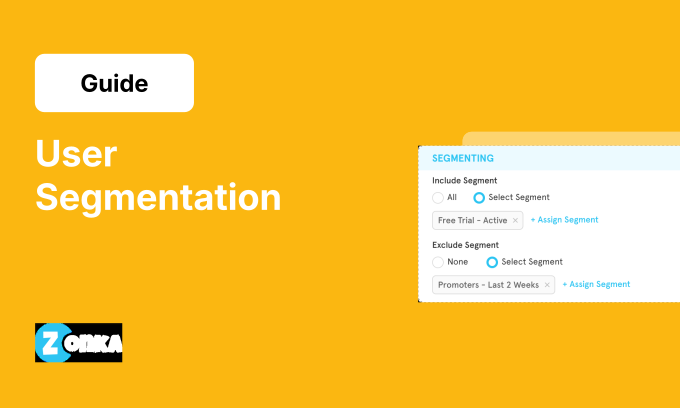


TL;DR
- User segmentation divides your user base into groups based on shared characteristics: demographics, behavior, firmographics, or product usage patterns.
- The six core types: demographic, firmographic, technographic, behavioral, psychographic, and customer data segmentation.
- Why it matters for feedback: segmented surveys get 2–3x higher response rates than one-size-fits-all blasts.
- The real value isn't in the grouping. It's in sending the right survey to the right user at the right moment.
- Advanced segmentation tools let you trigger surveys automatically based on user behavior, journey stage, or CRM data. No manual lists required.
Most teams send one survey to their entire user base. Then they wonder why response rates hover around 8% and the feedback feels thin.
Here's the problem: your users aren't one audience. They're dozens. A trial user on day three has different concerns than an enterprise customer approaching renewal. A power user who logs in daily thinks about your product differently than someone who opened it once last month.
When you send the same survey to all of them, you're asking the wrong questions to most of them. The customer feedback you collect reflects that mismatch. Vague. Surface-level. Hard to act on.
User segmentation fixes this. Not by making your surveys fancier, but by making them relevant to the person receiving them, at the moment they receive them.
This guide covers what user segmentation actually means, the six types that matter, how to implement it without overcomplicating things, and the specific surveys that work for each segment. The goal isn't to understand segmentation as a concept. It's to collect product feedback you can actually use.
What is User Segmentation?
User segmentation is the practice of dividing your user base into distinct groups based on shared characteristics. Those characteristics might be demographic (age, location), behavioral (feature usage, login frequency), firmographic (company size, industry), or tied to their relationship with your product (plan type, journey stage).
The idea is simple: users aren't homogeneous. What they need, expect, and experience varies. Treating them identically in marketing, product development, and feedback collection misses the mark.
For product managers and CX teams, segmentation answers a specific question: who should we ask, and what should we ask them?
A SaaS company might segment by plan tier. An e-commerce platform might segment by purchase recency. A mobile app might segment by device type or session frequency. The segments you choose depend on what decisions you're trying to make.
We've seen teams skip segmentation entirely and then struggle to explain why their NPS surveys pull 8% response rates while competitors hit 25%+. The difference is almost always targeting. The survey reached people who had no reason to care about the questions being asked.
Segmentation isn't about complexity. It's about fit. Match the survey to the user, and the user feedback gets sharper. That's the whole point.
6 Types of User Segmentation
Segmentation frameworks vary, but six types cover most use cases. Each has a different application for how you collect and act on feedback.
| Type | Based on | Best for Feedback When... |
| Demographic | Age, gender, location, language, income | You need to adapt survey format, length, or language by audience |
| Firmographic | Company size, industry, revenue, job title | Enterprise and SMB users need different survey cadences and depth |
| Technographic | Device type, OS, browser, integration stack | You need to match survey channel (in-app vs email) to how users access your product |
| Behavioral | Feature usage, login frequency, session duration, actions taken | You want to trigger surveys based on what users actually do, not when the calendar says |
| Psychographic | Attitudes, values, sentiment (NPS score) | You need to route follow-ups differently for Promoters vs Detractors vs Passives |
| Customer Data | Plan type, account age, renewal date, journey stage | You want to match the survey to the relationship stage (trial vs active vs renewal) |
1. Demographic Segmentation
This groups users by personal attributes: age, gender, income, education level, location, language. It's the most straightforward type. The data is often available at signup.
Feedback application: Demographics shape how users respond to surveys. Younger users may prefer shorter, visual surveys (emoji scales, single-tap ratings). Older users may tolerate longer forms. Location affects language and timing. A survey sent at 9am in San Francisco arrives at midnight in Mumbai.
Example: A consumer app might send shorter, mobile-optimized NPS surveys to Gen Z users and traditional rating scales with follow-up text fields to older demographics.
2. Firmographic Segmentation
For B2B products, firmographic data describes the user's organization: industry, company size, annual revenue, employee count, job title.
Feedback application: Enterprise accounts and SMBs have different expectations. An enterprise customer expects white-glove treatment, so a two-question transactional survey after a support ticket makes sense. An SMB user might be the founder doing everything themselves. A longer relationship survey quarterly gives them space to share what's working and what isn't.
Example: Enterprise accounts get quarterly relationship surveys from the account manager. SMB users get automated CSAT after support tickets close.
3. Technographic Segmentation
This segments users by the technology they use: device type, operating system, browser, CRM platform, integration stack.
Feedback application: Technographics determine how you reach users. Mobile-heavy users respond better to in-app surveys. Desktop users tolerate email. If you know a user connects via Salesforce, you can trigger surveys based on CRM events instead of generic time delays. For teams collecting feedback across both web and mobile digital feedback touchpoints, technographic data tells you which channel will actually get a response.
Example: Segment by device and you'll often find mobile users abandon surveys at question four. Desktop users complete longer forms. Adjust survey length by channel.
4. Behavioral Segmentation
Behavioral segmentation groups users by what they do in your product: feature usage, login frequency, session duration, support tickets filed, actions taken.
This is where feedback programs actually differentiate. Demographics tell you who someone is. Behavior tells you what they care about.
Feedback application: Power users who log in daily are the right audience for feature-depth questions. Inactive users who haven't logged in for two weeks are candidates for churn-risk surveys. New users who just hit a milestone need onboarding feedback.
We've seen teams increase response rates by 40%+ just by matching survey timing to usage patterns. A user who just completed a key workflow is far more likely to respond than one who hasn't opened the app in a week.
Example: Users who haven't logged in for 14 days get a re-engagement survey asking what's blocking them. Users who log in daily get feature feedback surveys after they interact with a new release.
Pro tip from our team: The behavioral triggers that work best in our experience are completion-based, not time-based. "User finished onboarding step 3" outperforms "user signed up 7 days ago" because the first one catches them at a moment of context. Our platform lets you set triggers by feature usage, journey stage, or specific in-app activity, and the segments auto-update as users qualify. That auto-update matters. A segment list that was accurate last Tuesday is already stale if users have changed behavior since then.
5. Psychographic Segmentation
This segments users by attitudes, values, interests, and sentiment. Less about what they do, more about how they feel.
Feedback application: If you're running NPS surveys, you're already doing psychographic segmentation. Promoters (9–10) are your advocates and the right audience for review requests. Detractors (0–6) need recovery surveys asking what went wrong. Passives (7–8) are persuadable. Feature interest surveys help identify what would move them.
Example: After each NPS response, route the follow-up dynamically: Promoters get a review request. Detractors get a "What can we do better?" survey with a callback option. Passives get a feature prioritization question.
6. Customer Data Segmentation
This uses CRM or product database fields: plan type, account age, renewal date, customer journey stage, assigned account manager.
Feedback application: A user 30 days from renewal sees different questions than a user who signed up yesterday. A free-tier user has different concerns than someone on an enterprise contract. Segmenting by customer data lets you match the survey to the relationship stage.
Example: Trial users approaching their expiration date get conversion-focused surveys: "What's missing that would make you upgrade?" Long-term customers approaching renewal get relationship health checks: "How has your experience been over the past year?"
Why User Segmentation Matters for Product Feedback
Segmentation isn't a nice-to-have. It's the difference between feedback that sits in a dashboard and feedback that drives decisions.
1. Higher Response Rates
Generic surveys get ignored. They feel irrelevant, badly timed, disconnected from the user's actual experience.
Segmented surveys feel relevant. The user recognizes the question as something that applies to them, at this moment. That recognition is what drives completion.
In our experience, surveys matched to the user's journey stage see 2–3x better completion rates than batch-and-blast approaches. The math is simple: relevance increases response.
2. Cleaner, More Useful Data
When feedback is segmented at collection, analysis becomes easier. You can compare across groups: "Enterprise users hate feature X, SMB users love it." That's not a survey result. That's a product decision waiting to be made.
Unsegmented feedback flattens these signals. You see an average score, but the average hides the variance. Segmented data surfaces the patterns that matter.
This is where segmentation connects to the product feedback loop. Feedback that's already grouped by segment flows directly into the decisions each team needs to make.
3. Faster Closed-Loop Action
When feedback comes in pre-segmented, routing is automatic. Detractor responses go to the retention team. Feature requests from power users go to product. Onboarding friction from new users goes to the success team.
Without segmentation, someone has to manually triage every response. That step is where feedback dies in most organizations.
Closing the feedback loop requires knowing who gave the feedback and what action fits their situation.
Pro tip from our team: We route by segment AND score simultaneously. A detractor from an enterprise account triggers a different workflow than a detractor from a free trial. Same score, different urgency, different owner. One of our customers, a global eyewear e-commerce company, needed to track separate NPS scores for different product categories (prescription glasses vs sunglasses). When they started segmenting feedback by product line and routing each to the relevant team, their NPS improved by 30% because issues reached the right people instead of sitting in a shared inbox.
The point isn't to collect more feedback. It's to collect feedback you can actually use.
How to Implement User Segmentation for Surveys
Segmentation sounds complex. It doesn't have to be. Start simple, expand as you learn.
Step 1: Audit Your Current Data Sources
Before building segments, inventory what you already know. Your CRM has account data. Your product analytics tool tracks behavior. Your support system logs tickets and resolution times.
Map what's available. Most teams discover they can segment by 5–10 attributes today, without collecting anything new.
Step 2: Define Segments Based on Business Goals
Don't segment for the sake of segmentation. Start with the decision you're trying to make.
If your goal is reducing churn, segment by churn risk signals: inactivity, declining usage, support ticket volume. If your goal is improving onboarding, segment by journey stage: signup, activation, first value milestone. For a broader view of how segmentation fits into the strategic layer, the product feedback strategy guide covers audience design as one of four pillars.
Teams that start with 3–4 segments get useful data. Teams that start with 15 segments get analysis paralysis.
Step 3: Map Segments to Survey Types
Build a simple matrix:
| Segment | Trigger | Survey Type | Channel |
| Trial users | Day 7 of trial | Onboarding CSAT | In-app |
| Power users | After feature release | Feature feedback | |
| Inactive users | 14+ days inactive | Churn risk survey | |
| Promoters | After NPS response | Review request | |
| Enterprise accounts | Quarterly | Relationship NPS | Email via account manager |
This matrix becomes your operating playbook. Each segment has a defined trigger, survey type, and channel.
Step 4: Set Up Automated Triggers
Manual segmentation doesn't scale. If someone has to pull a list and send surveys by hand, the program will die within a quarter.
Connect your survey tool to your CRM and product analytics. Set up triggers: when a user hits a milestone, when an account enters a stage, when behavior changes. The product feedback feature in most modern platforms handles this automatically.
Pro tip from our team: We connect survey triggers to three data sources simultaneously: CRM (account stage, renewal date), product analytics (feature usage, login frequency), and support system (open tickets, resolution status). One of our fintech customers integrated their feedback triggers with Zendesk so surveys fired automatically when a support ticket closed. That integration alone let them reach nearly 600,000 users with contextual feedback requests they couldn't have sent manually. CRM data alone misses behavior. Behavior data alone misses account context. You need both.
Step 5: Analyze Feedback BY Segment
Don't flatten segmented data into one dashboard. The whole point is to see differences between groups.
Compare: How do Promoters describe your product versus Detractors? What do enterprise users request that SMBs don't? Where does onboarding friction show up for mobile users but not desktop?
Segment-level analysis is where the insights live.
Surveys for Different User Segments
Theory is useful. Application is better. Here's how specific segments map to specific survey types. (For the collection channels that deliver these surveys, see ways to collect product feedback.)
Trial Users → Free Trial Survey
Goal: Understand friction before the conversion deadline.
Timing: Day 3–4 of the trial. Not day one (too early, they haven't experienced anything). Not day 14 (too late, the decision is already made).
Questions to ask:
- What brought you to [product]?
- What's been confusing so far?
- What feature would make you upgrade?
We've found that surveying at the "first friction" moment gets 3x better qualitative feedback. Users have enough context to give useful answers but haven't yet decided to leave.
New Users → Onboarding Survey
Goal: Catch friction early, improve activation rates.
Timing: After a key onboarding milestone, not after signup. The milestone varies by product: first project created, first integration connected, first report generated.
Questions to ask:
- How easy was it to get started?
- What almost made you give up?
- What's still unclear?
Link to the product feedback form template for a ready-to-use version.
Existing Users → Relationship NPS
Goal: Track loyalty over time, catch drift before it becomes churn.
Timing: Quarterly, or tied to usage milestones (100th login, one-year anniversary).
Questions to ask:
- How likely are you to recommend [product] to a colleague?
- What's the primary reason for your score?
The follow-up question matters more than the number. The NPS methodology is built for tracking trends, but the verbatim responses are where the signals that drive retention live.
Power Users → Feature Feedback Surveys
Goal: Deep product insights from your most engaged users.
Timing: After feature releases, or when usage of a specific feature spikes.
Questions to ask:
- How useful is [feature] for your workflow?
- What's missing?
- What would you change?
Power users have opinions. They'll share them if you ask the right product feedback questions. Short surveys with open-text fields work best. They don't need hand-holding.
Inactive Users → Re-engagement / Churn Survey
Goal: Understand why they stopped using the product.
Timing: 14+ days inactive. Before they fully churn.
Questions to ask:
- What made you stop using [product]?
- Is there something we could do to bring you back?
- Would you be open to a quick call to discuss?
These surveys have lower response rates because the user has already disengaged. But the responses you do get are high-signal. They tell you what your product is missing for a specific type of user. To see how companies handle these moments effectively, see product feedback examples.
Mobile App Users → In-App SDK Surveys
Goal: Contextual feedback without email friction.
Timing: After specific in-app actions like completing a task, reaching a level, or using a feature for the first time.
Channel: In-app surveys via SDK. The survey appears inside the app, in context, while the experience is fresh.
For mobile-specific considerations, see the mobile app surveys guide.
Common Segmentation Mistakes to Avoid
Segmentation is powerful. It's also easy to overcomplicate. Here's what we've seen go wrong.
Mistake 1: Over-Segmenting Before You Have Volume
Fifty segments with ten responses each equals noise. You can't draw conclusions from sample sizes that small.
Start with 3–5 segments. Expand when you have statistically meaningful data in each group. "Statistically meaningful" varies by use case, but a rough floor is 100+ responses per segment before you start slicing further.
Mistake 2: Segmenting by Attributes You Can't Act On
Knowing someone's browser doesn't help unless you're going to build a browser-specific experience. Knowing their timezone matters only if you'll adjust send times.
Segment by attributes that connect to decisions you'll actually make. If you're not going to do anything different for segment X versus segment Y, combining them into one group is fine.
Mistake 3: Sending the Same Survey to Every Segment
This defeats the purpose. If all segments receive identical questions, why segment?
The value of segmentation is differentiation. Different questions. Different timing. Different channels. If the survey doesn't change, the segmentation is just categorization. Useful for analysis, but not for collection.
Mistake 4: Forgetting to Update Segments
Users change. A trial user becomes a customer. A power user goes inactive. An SMB account grows into an enterprise contract.
Static segment lists decay. Dynamic segmentation, where users move between segments automatically based on real-time data, is what keeps the program accurate over time.
The goal isn't perfect segments. It's segments good enough to make your feedback useful.
How Do You Start Segmenting Users for Feedback?
Your users are different. Their needs are different. Their relationship with your product is different. And the feedback they can give you, if you ask the right questions at the right moment, is different too.
The mechanics aren't complicated. Audit what you know. Define 3–5 segments tied to business goals. Map each segment to a survey type and trigger. Automate the sends. Analyze by segment, not in aggregate.
What changes is the quality of what comes back. Responses that feel specific. Signals you can route to the right team. Patterns you can act on.
Start with one segment. Trial users, power users, inactive users. Pick the group where better feedback would change what you build. Design a survey for them. Watch what comes back.
That's the starting point. Everything else builds from there. Schedule a demo →


.png)
.svg)
.png)