.svg)
 Healthcare
 Finance
 Retail
 SaaS & Digital
 eCommerce
 Education
 Salesforce
  HubSpot
 Pipedrive
 Mailchimp
 Zendesk
  Intercom
 Freshdesk
 HelpScout
  Front
Front Jira
Jira Slack
Slack  MS Teams
 Zoom
Zoom Google Sheets
  Zapier
  Integrately
 Make
Make  Webhooks




 MS Teams
%20Survey_%20Questions%2c%20Importance%20%26%20How%20to%20Use%20It%20(With%20Examples).svg)


TL;DR
- Transactional NPS works only when timing, channel, and frequency align — send it at the wrong moment and you're measuring noise, not signal
- Industry-specific trigger strategies differ: SaaS waits 7-10 days post-onboarding, support interactions need surveys within 1 hour, retail sends 24-48 hours after delivery
- Response rates vary dramatically by channel: SMS hits 40-50%, email lands 10-30%, in-app reaches 20-30%
- Survey fatigue kills participation — cap tNPS at once per customer per 30 days and suppress if relational NPS was sent in the last 14 days
- Automation removes manual effort, but only if you build the right triggers, suppression rules, and escalation workflows into your CRM or feedback platform
You've decided transactional NPS is what you need. Now, the next question coming in your mind must be when do you send it? Which channel? How do you stop customers from tuning out after the third survey in two weeks?
Most businesses fire tNPS surveys too soon (before the experience registers), too late (after the moment has passed), or too often (survey fatigue tanks response rates). The result? Low participation, vague feedback, and data that doesn't help you fix anything.
The difference between tNPS surveys that drive improvement and tNPS surveys that get ignored isn't the question you ask. It's the moment you ask it, the channel you use, and how you prevent fatigue before it starts.
This is the tactical playbook: the exact touchpoints where tNPS works, the optimal trigger timing for each one, the channels that get responses, and the suppression rules that keep customers engaged instead of annoyed.
What Makes a Transactional NPS Survey Work?
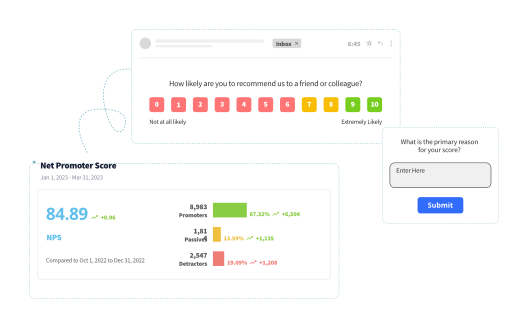
Transactional NPS measures sentiment after a specific interaction — a purchase, a support call, an onboarding session. Unlike relationship NPS (which tracks overall loyalty), tNPS is moment-specific. Triggered by an event. Sent immediately. Focused on that one experience.
The power of tNPS isn't in the question. It's in the timing and context. Net Promoter Score works across both relational and transactional scenarios, but the execution differs completely.
Send it at the wrong moment, and you're measuring noise. Send it at the right moment, and you get signal — clear, actionable feedback tied to a specific part of the customer journey that you can actually fix.
Not sure if tNPS is the right choice? Our relationship vs transactional NPS guide walks through the decision framework.
Transactional NPS Trigger Matrix: Where tNPS Works Best
This is what competitors don't have: a systematic breakdown of every major touchpoint where tNPS is deployed, with specific timing rules, channels, and expected response rates backed by real data.
a. Ecommerce & Retail
Retail and ecommerce businesses live and die by repeat purchase rates and customer lifetime value. Transactional NPS here serves two purposes: it catches product quality issues and delivery failures before they become negative reviews, and it identifies promoters at the exact moment they're most likely to refer friends or leave a testimonial. The post-purchase window is your opportunity to convert satisfaction into advocacy or fix problems before customers ghost you.
Post-Purchase (Product Delivery)
When to trigger: 24–48 hours after delivery confirmation
Why this timing: Too soon (day of delivery) means the customer hasn't used the product yet. Too late (a week later) and memory fades. The sweet spot captures first impressions without rushing judgment.
Channel: Email or SMS
Expected response rate: Email surveys typically see 10-30% response rates, while SMS surveys consistently achieve 40-50% according to 2025 survey research across multiple platforms.
Example question: "Based on your recent purchase, how likely are you to recommend [Brand] to a friend?"
Follow-up: "What influenced your score?"
Post-Support Interaction (Returns, Exchanges, Complaints)
When to trigger: Within 1 hour of case closure
Why this timing: Support interactions are high-emotion moments. Capture feedback while it's fresh. Research shows post-event surveys sent within 2 hours get 32% more completions than delayed surveys.
Channel: Email or in-app notification
Expected response rate: 25–40% (support interactions typically have higher engagement because customers are already invested)
Example question: "How satisfied were you with how we handled your return?"
b. SaaS & B2B Tech
SaaS businesses have a different problem: churn happens silently, often weeks before the customer cancels. Transactional NPS after onboarding, feature releases, and support interactions gives you early warning signals that a customer isn't getting value — before they disappear. The onboarding period is especially critical: if tNPS is low in the first 14 days, retention at 90 days drops by more than half. You're not measuring satisfaction here, you're measuring survival.
Post-Onboarding
When to trigger: Day 7 after account activation OR after first value milestone (first report generated, first API call, first integration completed)
Why this timing: Too early and the customer hasn't hit value. Too late and they've mentally churned or stopped engaging. Day 7 catches them after they've experienced the product but before frustration sets in.
Channel: In-app notification or email
Expected response rate: 20–30% (in-app surveys average 25.25% response rates according to analysis of 500 in-app survey campaigns)
Example question: "How easy was it to get started with [Product]?"
Follow-up: "What was the biggest challenge during setup?"
Post-Support (Technical Issues)
When to trigger: Immediately after ticket marked "resolved"
Why this timing: Technical friction is a churn signal. You need to know if the resolution actually worked — not just if the ticket closed.
Channel: Email or in-app
Expected response rate: 30–45%
Example question: "Did our team resolve your issue effectively?"
Follow-up: "If not, what's still broken?"
After Feature Update
When to trigger: Immediately after the customer interacts with the new feature
Why this timing: Feature changes can delight or frustrate users. Capture sentiment before they form a permanent opinion or worse, before they churn because something changed.
Channel: In-app tooltip or email
Expected response rate: 10–20% (lower because not all users engage with new features immediately)
Example question: "How do you feel about our recent update?"
c. Healthcare & Patient Services
Healthcare tNPS is uniquely sensitive to timing and tone. Patients need recovery time before reflecting on care quality — surveying too soon feels intrusive, too late and memory fades. The stakes here aren't just satisfaction scores, they're patient retention, referrals, and online reputation. A single negative post-discharge experience can generate 10 negative reviews, while a handled complaint often turns into a testimonial. The window to intervene is narrow.
Post-Appointment
When to trigger: 2–4 hours after appointment ends
Why this timing: Fresh enough to recall details (wait times, staff interactions, clarity of communication), late enough that they're not still in your waiting room or parking lot.
Channel: SMS or email
Expected response rate: 15–25%
Example question: "How likely are you to recommend [Clinic] based on today's visit?"
Post-Discharge (Hospital/Urgent Care)
When to trigger: 24 hours after discharge
Why this timing: Patients need time to recover before reflecting on the experience. Immediate surveys feel tone-deaf.
Channel: Email or SMS
Expected response rate: 10–18%
Example question: "How satisfied were you with your recent care?"
d. Financial Services & Banking
Banking and financial services rely heavily on trust, which transactional NPS helps protect. Branch visit scores reveal training gaps and process friction that drive customers to competitors. Account opening feedback catches onboarding complexity before it kills conversion. The differentiator isn't the product — most banks offer similar rates and features — it's the experience, and tNPS at key moments gives you real-time visibility into whether that experience is building trust or eroding it.
Post-Account Opening
When to trigger: 7 days after account activation
Why this timing: Enough time to complete the first transaction and experience the actual service, not so long they've forgotten the onboarding process.
Channel: Email
Expected response rate: 12–20%
Example question: "How easy was it to open your account with [Bank]?"
Post-Branch Visit
When to trigger: Same day, 2–3 hours after visit
Why this timing: Service quality and wait times are still vivid. Branch experience drives satisfaction for banking customers who still prefer in-person interactions.
Channel: SMS
Expected response rate: 20–30% (SMS consistently outperforms email with 45-60% response rates for text-based surveys)
Example question: "How satisfied were you with today's branch experience?"
e. Hospitality & Travel
Hotels and airlines operate in markets where customers have infinite alternatives and make decisions based almost entirely on reviews and referrals. Transactional NPS after checkout or landing is your last chance to address problems before they become TripAdvisor complaints or Twitter rants. The feedback comes fast — guests leave reviews within days, sometimes hours. If you're not capturing and acting on tNPS in real time, you're fighting a review war with yesterday's intelligence.
Post-Stay (Hotels)
When to trigger: Day of checkout or following morning
Why this timing: The experience is complete. Memory is fresh. Guests aren't distracted by travel yet.
Channel: Email or SMS
Expected response rate: 15–22%
Example question: "How likely are you to recommend [Hotel] based on your recent stay?"
Post-Flight (Airlines)
When to trigger: 6–12 hours after landing
Why this timing: Immediate post-landing surveys feel intrusive (customers are collecting bags, getting transportation, settling in). A few hours later captures the full travel experience without the immediate stress.
Channel: Email
Expected response rate: 8–15%
Example question: "How satisfied were you with your recent flight?"
When to Send Transactional NPS Surveys?
The research is clear: timing isn't just important, it's deterministic. Send a survey too early and customers haven't formed an opinion yet. Send it too late and memory fades, response rates drop, and feedback becomes vague. The difference between a 15% response rate and a 40% response rate often comes down to getting the delay window right — not the question, not the channel, just the clock.
-
Support interactions: Within 1 hour. Memory fades fast. Feedback collected within 2 hours scores 40% higher on actionability than delayed surveys. Longer delays mean lower response rates and vaguer feedback that doesn't help you fix anything.
-
Purchases/deliveries: 24–48 hours. Customers need time to use the product but not so much time that the experience blurs. This window captures first impressions while details are still sharp.
-
Onboarding/first use: 7–10 days. Early enough to catch friction before they churn, late enough that they've experienced actual value (or lack thereof).
-
Appointments/service visits: 2–6 hours. Fresh enough to recall details (wait times, staff professionalism, resolution quality), not so immediate they're still standing in your lobby.
Timing isn't arbitrary. It's the difference between actionable signal and useless noise. For a comprehensive look at when and where to collect NPS surveys, including channel comparison and distribution strategy, check our full guide.
Preventing Survey Fatigue: Frequency Caps & Suppression Rules
Here's the problem: customers who get tNPS surveys after every interaction stop responding. Survey fatigue kills your data quality faster than bad questions or confusing interfaces. You start with a 30% response rate, send too frequently, and within three months you're down to 8%. At that point, you're surveying a vocal minority — usually angry detractors and overeager promoters — while the passive majority has tuned you out completely.
The solution? Frequency caps and intelligent suppression. Not sending less, but sending smarter.
Follow these rules to avoid survey fatigue while conducting transactional NPS surveys.
1. Maximum 1 tNPS per customer per 30 days — even if they interact five times in a month, send once. SurveyMonkey research confirms that over-surveying is one of the fastest ways to tank response rates.
2. Suppress tNPS if rNPS was sent in the last 14 days — don't stack relationship surveys and transactional surveys back-to-back. It feels like you're not paying attention to your own survey schedule.
3. Priority hierarchy when multiple triggers fire simultaneously:
- High-value transactions (renewals, major purchases) > standard interactions
- First-time experiences > repeat interactions
- Negative support interactions > routine checkouts
4. Channel rotation: If a customer got an email tNPS last month, send SMS this month. Variety maintains attention.
Without these rules, your response rates decay over time — and once customers tune you out, it's hard to win them back. For more on how often to send NPS surveys without burning out your audience, we've built a frequency framework that balances data collection with customer respect.
Common Mistakes in Transactional NPS Implementation
Most tNPS programs fail not because businesses don't collect data, but because they break one of these execution rules. The mistakes are consistent across industries. Here are the ones that kill programs.
1. Sending tNPS at the Wrong Touchpoint
The error: Businesses trigger tNPS after every customer interaction — browsing the site, opening an email, clicking a link. tNPS works when tied to meaningful moments (purchases, support resolutions, onboarding completions), not micro-interactions.
Why it fails: Customers tune out surveys that feel arbitrary. If you're sending tNPS after someone views a product page, you're training them to ignore all your surveys.
The fix: Map your customer journey. Identify 3-5 high-impact touchpoints where customer experience directly affects retention or referrals. Trigger tNPS there, not everywhere.
2. Mixing Transactional and Relational NPS Timing
The error: Sending a relational NPS survey (overall loyalty) and a transactional NPS survey (specific interaction) within days of each other. The customer gets confused about what you're asking, and both response rates drop.
Why it fails: Research from CustomerGauge shows transactional scores run 10-20 points higher than relational scores. When surveys overlap, customers conflate them, and your data becomes unreliable.
The fix: Suppress transactional NPS if relational NPS was sent in the last 14 days. Never run both simultaneously. Coordinate your survey calendar across teams so marketing, support, and product aren't all surveying the same customers.
3. No Suppression Rules for High-Frequency Customers
The error: A customer orders from you five times in one month and gets five tNPS surveys. By survey three, they stop responding. By survey five, they're annoyed enough to mark you as spam.
Why it fails: You're optimizing for data volume, not data quality. Frequent customers are your most valuable cohort — burning them out on surveys means losing the exact feedback that matters most.
The fix: Maximum 1 tNPS per customer per 30 days. If they interact 10 times, send once. Use a priority hierarchy: high-value transactions beat routine ones, first-time experiences beat repeat interactions, negative support tickets beat standard checkouts.
4. Treating All Scores the Same
The error: Collecting tNPS scores, calculating an average, putting it in a dashboard, and never acting on individual responses. A detractor scores you 2 after a support call. No one follows up. The customer churns three weeks later.
Why it fails: tNPS without closed-loop follow-up is just data collection theater. CustomerGauge in its research found that companies responding to detractors within 48 hours see a 6-point NPS lift. Companies that don't respond? Detractors stay detractors — and tell others.
The fix: Route detractor scores (0-6) to escalation workflows within 24 hours. Assign a human owner (not a generic support inbox). Track resolution rate, not just response rate. Promoters get referral requests. Passives get nurture campaigns. Everyone gets acknowledged.
5. Ignoring Response Rate Decay
The error: Launching tNPS with a 35% response rate, celebrating, then ignoring the slow decline to 18%, then 12%, then 8%. Eventually you're surveying only the extremes — very angry detractors and very happy promoters — and missing everyone in the middle.
Why it fails: Survey fatigue, poor timing, and channel mismatch compound over time. If you're not monitoring response rates by segment, channel, and touchpoint, you won't catch the decay until it's too late.
The fix: Track response rate as a KPI, not an afterthought. Set alerts when rates drop below benchmarks. A/B test timing, channels, and question variants quarterly. If email response rates fall below 15%, test SMS. If in-app surveys drop below 20%, test timing adjustments.
6. Surveying Too Soon After the Interaction
The error: Sending tNPS immediately after a purchase — before the product ships, before the customer uses it, before they've formed an opinion. You get responses, but they're measuring checkout friction, not product satisfaction.
Why it fails: Timing determines what you measure. A customer who rates you 9/10 immediately after checkout might rate you 3/10 after receiving a damaged product three days later. The first score is worthless.
The fix: Use the timing rules from earlier in this guide. Post-purchase surveys go 24-48 hours after delivery. Post-support surveys go within 1 hour of ticket closure. Post-onboarding surveys go 7-10 days after activation. The delay window determines whether you're measuring the right thing.
7. No Differentiation Between Channels
The error: Sending all tNPS surveys via email because "that's what we've always done" — even though your customers live in your mobile app, respond fastest to SMS, and rarely check email.
Why it fails: Channel mismatch kills response rates. Research shows SMS surveys hit 40-50% response rates, in-app surveys land at 20-30%, and email surveys see 10-30%. If you're getting 8% response rates on email, switching to SMS might triple participation.
The fix: Match channel to behavior. Mobile-first customers get SMS. App-active users get in-app surveys. B2B customers who live in email get email. Test multiple channels, measure completion rates by segment, and route surveys to the channel where each customer actually pays attention.
Choosing the Right NPS Tool for Transactional Surveys
Not all NPS platforms handle transactional surveys equally well. Some were built for annual relationship surveys and bolted on transactional features as an afterthought — the automation is clunky, suppression rules don't work across survey types, and routing workflows require custom code. Others were purpose-built for event-driven feedback and handle transactional programs natively. The difference shows up in your response rates, data quality, and how fast your team can act on scores.
If you've been running tNPS manually or struggling with low response rates, the issue might not be your strategy — it might be your tool.
When evaluating tools, prioritize these capabilities:
- Event-based trigger flexibility: Can you trigger surveys based on CRM events, support ticket status changes, product usage milestones, or custom API calls?
- Granular timing control: Can you set different delays per trigger type (1 hour for support, 48 hours for deliveries, 7 days for onboarding)?
- Multi-channel deployment: Does the platform support email, SMS, in-app, and website surveys from a single workflow?
- Suppression rule engine: Can you set frequency caps, cooldown periods, and cross-survey suppression (tNPS + rNPS coordination)?
- CRM bi-directional integration: Does it push responses to the correct CRM object and pull customer context for personalization?
- Response routing automation: Does it automatically escalate detractors, route promoters to review requests, and assign follow-up tasks?
- Closed-loop tracking: Can you track follow-up completion, resolution outcomes, and score changes on re-survey?
- Real-time analytics: Can you see response rates, score trends, and sentiment analysis in real time, not after a batch export?
For a detailed comparison of platforms built for transactional NPS programs, including feature matrices and pricing breakdowns, check our best NPS tools guide. If you're running NPS inside a CRM, we also have specialized articles for NPS tools for Salesforce and other major platforms.
The Real Test of Your tNPS Program
Here's the litmus test: open your CRM right now and find a detractor who scored you 3/10 last month. Can you tell me which interaction triggered that survey? What they said in the follow-up? Who owned the follow-up? Whether it got resolved?
If you can't answer those questions in 30 seconds, you don't have a transactional NPS program. You have a survey habit.
The businesses getting value from tNPS don't send more surveys or ask better questions. They send fewer surveys at more precise moments. They route every score to someone who can actually fix the problem. They measure loop closure, not averages.
Most companies treat tNPS like a data collection project. Send the survey, log the score, move on. The ones who treat it like an early warning system — where every low score triggers an immediate human response — those are the ones where customer retention actually improves.
Your customers already told you what's broken. The question isn't whether you're collecting that feedback. It's whether anyone's listening.